
Search…
Search…
Tokens
Live in Codebase
The design system uses a three-tier token architecture** that separates concerns between reference values, semantic system tokens, and component-specific implementations. This approach ensures consistency, maintainability, and scalability across both React Native and web platforms.
AA
WCAG 2.1 accessibility compliant
Tokens
The design system uses a three-tier token architecture** that separates concerns between reference values, semantic system tokens, and component-specific implementations. This approach ensures consistency, maintainability, and scalability across both React Native and web platforms.
Tokens
Live in Codebase
The design system uses a three-tier token architecture** that separates concerns between reference values, semantic system tokens, and component-specific implementations. This approach ensures consistency, maintainability, and scalability across both React Native and web platforms.
AA
WCAG 2.1 accessibility compliant
Token Structure
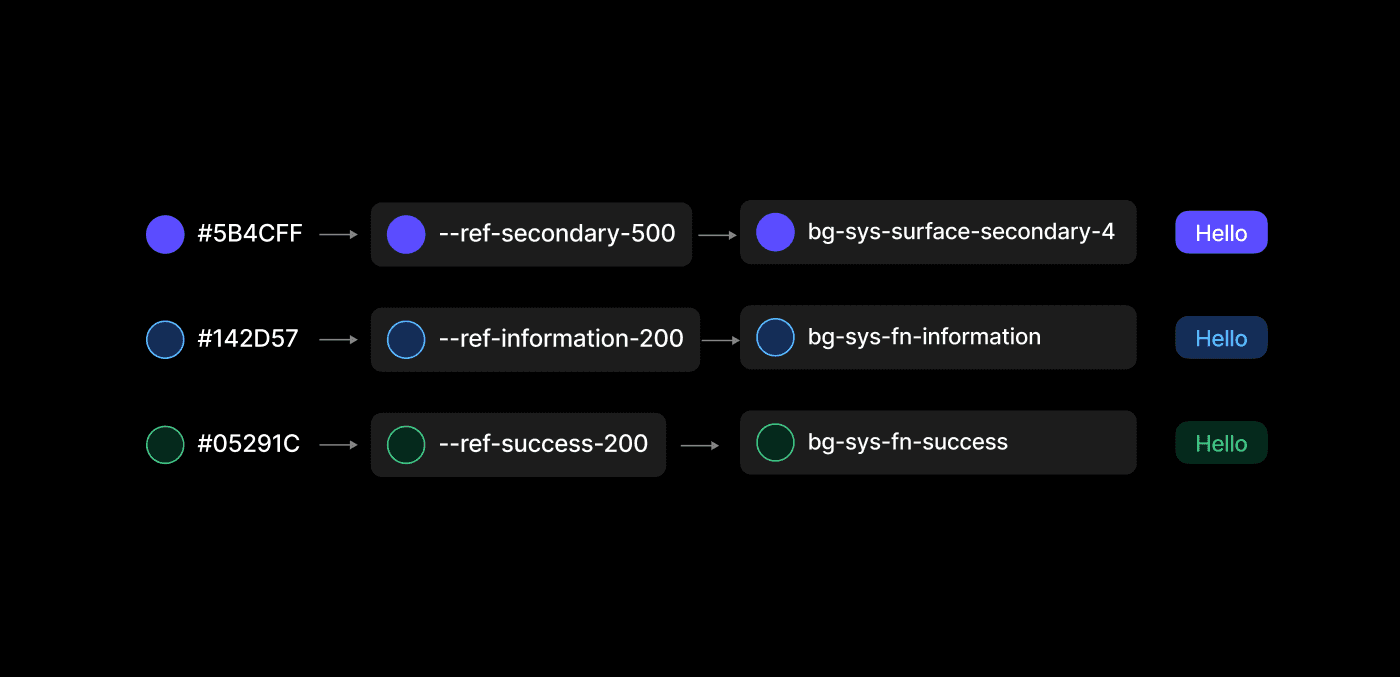
This document outlines the comprehensive token architecture used in this mobile-first design system, built for React Native with Expo 53 and NativeWind v4. The color system uses a three-tier architecture with HSL format for optimal design flexibility.
Reference Tokens → System Tokens → Component Usage
Token Categories
1. Color Tokens
The color system uses a three-tier architecture with HSL format for optimal design flexibility
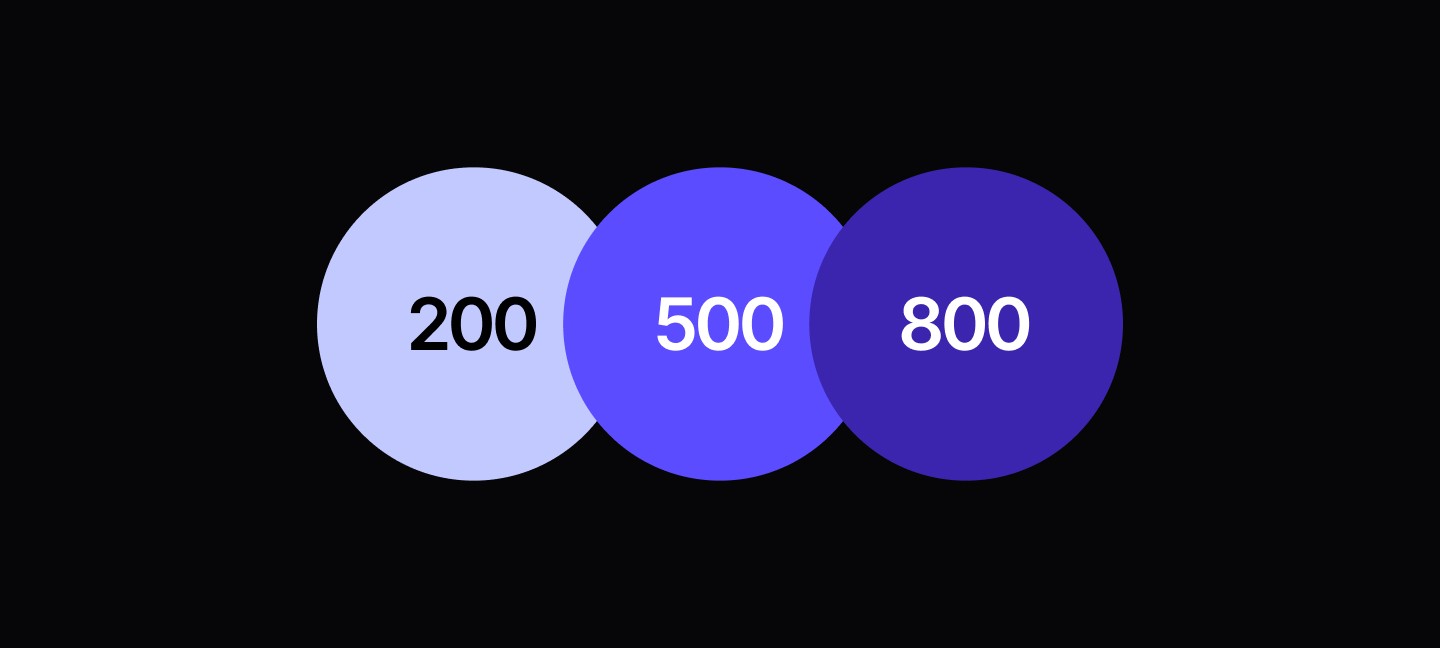
Reference Layer --ref
Raw color values organized by semantic color families
/* Neutral colors (50-950 scale) */
--ref-neutral-50: "210 40% 98%"
--ref-neutral-100: "210 40% 96%"
--ref-neutral-950: "222.2 84% 4.9%"

/* Secondary colors */
--ref-secondary-50: "210 40% 98%"
--ref-secondary-500: "217.2 32.6% 17.5%"

/* Functional colors */
--ref-success-500: "142.1 76.2% 36.3%"
--ref-error-500: "346.8 77.2% 49.8%"
--ref-warning-500: "47.9 95.8% 53.1%"
--ref-information-500: "221.2 83.2% 53.3%"
System Layer --ref
Semantic tokens that map reference colors to functional purposes
/* Surface tokens */
--sys-surface-neutral-0: var(--ref-neutral-50)    /* Primary backgrounds */
--sys-surface-card: var(--ref-neutral-100)        /* Card containers */
--sys-surface-disabled: var(--ref-neutral-200)    /* Disabled states */

/* Text tokens */
--sys-text-body: var(--ref-neutral-900)           /* Primary text */
--sys-text-secondary: var(--ref-neutral-600)      /* Secondary text */
--sys-text-disabled: var(--ref-neutral-400)       /* Disabled text */

/* Functional tokens */
--sys-fn-success: var(--ref-success-500)          /* Success indicators */
--sys-fn-error: var(--ref-error-500)              /* Error states */
--sys-border-default: var(--ref-neutral-300)      /* Default borders */
Component Implementation
Tailwind classes using system tokens
// Using system tokens in components
<Card className="bg-sys-surface-card border-sys-border-default">
  <Text className="text-sys-text-body">Content</Text>
  <Button className="bg-sys-fn-success">Save</Button>
</Card>
2. Spacing Tokens
The spacing system uses **semantic t-shirt sizing** that aligns with Figma design variables:
/* T-shirt sizing scale (0-64px) */
none:  0px     /* No spacing */
xxs:   4px     /* Extra extra small */
xs:    8px     /* Extra small */
sm:    12px    /* Small */
md:    16px    /* Medium (base) */
lg:    24px    /* Large */
xl:    32px    /* Extra large */
xxl:   40px    /* Extra extra large */
xxxl:  48px    /* Extra extra extra large */
xxxxl: 64px    /* Maximum */
Utility Categories
// Padding utilities
<View className="p-md">        {/* 16px all sides */}
<View className="px-lg py-sm"> {/* 24px horizontal, 12px vertical */}

// Margin utilities
<View className="mb-xl">       {/* 32px bottom margin */}
<View className="mx-auto">     {/* Centered horizontally */}

// Gap utilities (Flexbox/Grid)
<View className="gap-sm">      {/* 12px gap between children */}
<View className="gap-x-md">    {/* 16px horizontal gap */}

// Space between utilities
<View className="space-y-xs">  {/* 8px vertical space between children */
3. Component Usage Patterns
// Real examples from your codebase
<Card className="p-lg">                    {/* Large card padding: 24px */}
  <CardHeader className="pb-xs">           {/* Small bottom padding: 8px */}
    <CardTitle className="mb-sm">Title</CardTitle>  {/* Small margin: 12px */}
  </CardHeader>
  <CardContent className="gap-md">         {/* Medium gap: 16px */}
    <Text>Content</Text>
  </CardContent>
</Card>

<FormItem className="gap-sm mb-md">        {/* 12px gap, 16px bottom margin */}
  <FormLabel>Email</FormLabel>
  <Input className="px-sm py-xs" />        {/* 12px horizontal, 8px vertical */}
</FormItem>
3. Typography Tokens
Font sizing system optimized for mobile readability
/* Body text sizes */
xs:   12px/16px    /* BODYXS - Small annotations */
sm:   14px/20px    /* BODYSM - Secondary text */
base: 15px/20px    /* BODYBASE - Default body text */
md:   16px/23px    /* BODYMD - Primary content */
lg:   22px/28px    /* BODYLG - Large body text */
xl:   26px/28px    /* BODYXL - Emphasis text */

/* Heading sizes */
2xl:  15px/15px    /* HEADING2XL - Small headings */
3xl:  17px/36px    /* HEADING3XL - Subsection headings */
4xl:  20px/45px    /* HEADING4XL - Section headings */
5xl:  24px/45px    /* HEADING5XL - Page headings */
6xl:  32px/45px    /* HEADING6XL - Large headings */
7xl:  36px/45px    /* HEADING7XL - Display headings */
8xl:  40px/45px    /* HEADING8XL - Hero headings */
Font Family
fontFamily: { fontName: 'Inter' } /* Primary typeface */
4. Border Radius Tokens
Consistent corner radius system
none:    0px       /* No radius - sharp corners */
xs:      4px       /* Extra small - subtle rounding */
sm:      8px       /* Small - default components */
DEFAULT: 8px       /* Default fallback */
md:      12px      /* Medium - cards, modals */
lg:      24px      /* Large - prominent elements */
xl:      32px      /* Extra large - special elements */
xxl:     40px      /* Extra extra large */
xxxl:    64px      /* Extra extra extra large */
full:    999px     /* Fully rounded - pills, avatars */
Usage Examples
<Card className="rounded-md">        {/* 12px - card corners */}
<Button className="rounded-sm">      {/* 8px - button corners */}
<Avatar className="rounded-full">    {/* 999px - circular avatar */}
<Badge className="rounded-lg">       {/* 24px - badge corners */
5. Border Width Tokens
hairline: 0.5px    /* Hairline - subtle dividers */
none:     0px      /* No border */
sm:       1px      /* Small - default borders */
DEFAULT:  1px      /* Default fallback */
md:       2px      /* Medium - emphasis borders */
lg:       3px      /* Large - focus indicators */
Usage Examples
<Card className="border-sm">             {/* 1px default border */}
<Input className="border-md focus:border-lg"> {/* 2px → 3px on focus */}
<Separator className="border-hairline">  {/* 0.5px subtle divider */
Token Integration
// tailwind.config.js
module.exports = {
  theme: {
    extend: {
      colors: {
        // Reference tokens
        ref: {
          neutral: { 50: 'hsl(var(--ref-neutral-50) / <alpha-value>)', /* ... */ },
          secondary: { 50: 'hsl(var(--ref-secondary-50) / <alpha-value>)', /* ... */ },
          // ...
        },
        // System tokens
        sys: {
          'surface-neutral': { 0: 'hsl(var(--sys-surface-neutral-0) / <alpha-value>)', /* ... */ },
          'text': { body: 'hsl(var(--sys-text-body) / <alpha-value>)', /* ... */ },
          // ...
        }
      },
      spacing: {
        // Semantic spacing tokens
        'none': '0px', 'xxs': '4px', 'xs': '8px', 'sm': '12px',
        'md': '16px', 'lg': '24px', 'xl': '32px', 'xxl': '40px',
        'xxxl': '48px', 'xxxxl': '64px'
      },
      borderRadius: {
        'xs': '4px', 'sm': '8px', 'md': '12px', 'lg': '24px',
        'xl': '32px', 'xxl': '40px', 'xxxl': '64px', 'full': '999px'
      },
      borderWidth: {
        'hairline': '0.5px', 'sm': '1px', 'md': '2px', 'lg': '3px'
      }
    }
  }
}
CSS Custom Properties
Design tokens are defined as CSS custom properties for dynamic theming
:root {
  /* Reference tokens */
  --ref-neutral-50: 210 40% 98%;
  --ref-neutral-900: 222.2 84% 4.9%;

  /* System tokens */
  --sys-text-body: var(--ref-neutral-900);
  --sys-surface-card: var(--ref-neutral-100);
  --sys-border-default: var(--ref-neutral-300);
}

/* Dark theme overrides */
.dark {
  --sys-text-body: var(--ref-neutral-100);
  --sys-surface-card: var(--ref-neutral-800);
}
Cross-Platform Considerations
React Native Optimization
The token system is optimized for React Native with NativeWind
// Platform-specific spacing adjustments
<Text className="py-xs native:py-sm">
  {/* 8px → 12px on native for better touch targets */}
</Text>

// Responsive spacing using semantic tokens
<View className="p-md md:p-lg lg:p-xl">
  {/* Progressive padding: 16px → 24px → 32px */}
</View>
Design Token Benefits
Consistency |
|---|
Unified spacing scale across all components |
Consistent color application through semantic naming |
Standardized border radius and width values |
Maintainability |
|---|
Centralized token definitions |
Easy theme customization through CSS custom properties |
Clear separation between reference and semantic values |
Scalability |
|---|
Easy to add new tokens without breaking existing components |
Semantic naming allows for context-aware updates |
Platform-specific optimizations through responsive classes |
Developer Experience |
|---|
Intuitive t-shirt sizing (xs, sm, md, lg, xl) |
Clear token hierarchy (ref → sys → component) |
Comprehensive Tailwind class integration |
Accessibility |
|---|
WCAG 2.1 Level AA compliant color contrasts |
Touch target optimization through semantic spacing |
Screen reader friendly semantic structure |
Best Practices
/*Use Semantic Tokens*/
/*Always prefer semantic tokens over reference tokens in components*/

✅ <Text className="text-sys-text-body">
❌ <Text className="text-ref-neutral-900">

/*ollow T-Shirt Sizing*/
/*Use consistent sizing progression*/
✅ gap-xs gap-sm gap-md gap-lg
❌ gap-[6px] gap-[14px] gap-[18px]

/*Leverage Token Hierarchy*/
/*Understand the three-tier system*/
Reference (--ref-) → System (--sys-) → Component (className)

/*Platform Considerations*/
/*Use responsive utilities for cross-platform optimization*/
<Button className="px-md native:px-lg">
  {/* More padding on native for touch targets */}
</Button>
Token Structure
This document outlines the comprehensive token architecture used in this mobile-first design system, built for React Native with Expo 53 and NativeWind v4. The color system uses a three-tier architecture with HSL format for optimal design flexibility.
Reference Tokens → System Tokens → Component Usage
Token Categories
1. Color Tokens
The color system uses a three-tier architecture with HSL format for optimal design flexibility
Reference Layer --ref
Raw color values organized by semantic color families
/* Neutral colors (50-950 scale) */
--ref-neutral-50: "210 40% 98%"
--ref-neutral-100: "210 40% 96%"
--ref-neutral-950: "222.2 84% 4.9%"

/* Secondary colors */
--ref-secondary-50: "210 40% 98%"
--ref-secondary-500: "217.2 32.6% 17.5%"

/* Functional colors */
--ref-success-500: "142.1 76.2% 36.3%"
--ref-error-500: "346.8 77.2% 49.8%"
--ref-warning-500: "47.9 95.8% 53.1%"
--ref-information-500: "221.2 83.2% 53.3%"
System Layer --ref
Semantic tokens that map reference colors to functional purposes
/* Surface tokens */
--sys-surface-neutral-0: var(--ref-neutral-50)    /* Primary backgrounds */
--sys-surface-card: var(--ref-neutral-100)        /* Card containers */
--sys-surface-disabled: var(--ref-neutral-200)    /* Disabled states */

/* Text tokens */
--sys-text-body: var(--ref-neutral-900)           /* Primary text */
--sys-text-secondary: var(--ref-neutral-600)      /* Secondary text */
--sys-text-disabled: var(--ref-neutral-400)       /* Disabled text */

/* Functional tokens */
--sys-fn-success: var(--ref-success-500)          /* Success indicators */
--sys-fn-error: var(--ref-error-500)              /* Error states */
--sys-border-default: var(--ref-neutral-300)      /* Default borders */
Component Implementation
Tailwind classes using system tokens
// Using system tokens in components
<Card className="bg-sys-surface-card border-sys-border-default">
  <Text className="text-sys-text-body">Content</Text>
  <Button className="bg-sys-fn-success">Save</Button>
</Card>
2. Spacing Tokens
The spacing system uses **semantic t-shirt sizing** that aligns with Figma design variables:
/* T-shirt sizing scale (0-64px) */
none:  0px     /* No spacing */
xxs:   4px     /* Extra extra small */
xs:    8px     /* Extra small */
sm:    12px    /* Small */
md:    16px    /* Medium (base) */
lg:    24px    /* Large */
xl:    32px    /* Extra large */
xxl:   40px    /* Extra extra large */
xxxl:  48px    /* Extra extra extra large */
xxxxl: 64px    /* Maximum */
Utility Categories
// Padding utilities
<View className="p-md">        {/* 16px all sides */}
<View className="px-lg py-sm"> {/* 24px horizontal, 12px vertical */}

// Margin utilities
<View className="mb-xl">       {/* 32px bottom margin */}
<View className="mx-auto">     {/* Centered horizontally */}

// Gap utilities (Flexbox/Grid)
<View className="gap-sm">      {/* 12px gap between children */}
<View className="gap-x-md">    {/* 16px horizontal gap */}

// Space between utilities
<View className="space-y-xs">  {/* 8px vertical space between children */
3. Component Usage Patterns
// Real examples from your codebase
<Card className="p-lg">                    {/* Large card padding: 24px */}
  <CardHeader className="pb-xs">           {/* Small bottom padding: 8px */}
    <CardTitle className="mb-sm">Title</CardTitle>  {/* Small margin: 12px */}
  </CardHeader>
  <CardContent className="gap-md">         {/* Medium gap: 16px */}
    <Text>Content</Text>
  </CardContent>
</Card>

<FormItem className="gap-sm mb-md">        {/* 12px gap, 16px bottom margin */}
  <FormLabel>Email</FormLabel>
  <Input className="px-sm py-xs" />        {/* 12px horizontal, 8px vertical */}
</FormItem>
3. Typography Tokens
Font sizing system optimized for mobile readability
/* Body text sizes */
xs:   12px/16px    /* BODYXS - Small annotations */
sm:   14px/20px    /* BODYSM - Secondary text */
base: 15px/20px    /* BODYBASE - Default body text */
md:   16px/23px    /* BODYMD - Primary content */
lg:   22px/28px    /* BODYLG - Large body text */
xl:   26px/28px    /* BODYXL - Emphasis text */

/* Heading sizes */
2xl:  15px/15px    /* HEADING2XL - Small headings */
3xl:  17px/36px    /* HEADING3XL - Subsection headings */
4xl:  20px/45px    /* HEADING4XL - Section headings */
5xl:  24px/45px    /* HEADING5XL - Page headings */
6xl:  32px/45px    /* HEADING6XL - Large headings */
7xl:  36px/45px    /* HEADING7XL - Display headings */
8xl:  40px/45px    /* HEADING8XL - Hero headings */
Font Family
fontFamily: { fontName: 'Inter' } /* Primary typeface */
4. Border Radius Tokens
Consistent corner radius system
none:    0px       /* No radius - sharp corners */
xs:      4px       /* Extra small - subtle rounding */
sm:      8px       /* Small - default components */
DEFAULT: 8px       /* Default fallback */
md:      12px      /* Medium - cards, modals */
lg:      24px      /* Large - prominent elements */
xl:      32px      /* Extra large - special elements */
xxl:     40px      /* Extra extra large */
xxxl:    64px      /* Extra extra extra large */
full:    999px     /* Fully rounded - pills, avatars */
Usage Examples
<Card className="rounded-md">        {/* 12px - card corners */}
<Button className="rounded-sm">      {/* 8px - button corners */}
<Avatar className="rounded-full">    {/* 999px - circular avatar */}
<Badge className="rounded-lg">       {/* 24px - badge corners */
5. Border Width Tokens
hairline: 0.5px    /* Hairline - subtle dividers */
none:     0px      /* No border */
sm:       1px      /* Small - default borders */
DEFAULT:  1px      /* Default fallback */
md:       2px      /* Medium - emphasis borders */
lg:       3px      /* Large - focus indicators */
Usage Examples
<Card className="border-sm">             {/* 1px default border */}
<Input className="border-md focus:border-lg"> {/* 2px → 3px on focus */}
<Separator className="border-hairline">  {/* 0.5px subtle divider */
Token Integration
// tailwind.config.js
module.exports = {
  theme: {
    extend: {
      colors: {
        // Reference tokens
        ref: {
          neutral: { 50: 'hsl(var(--ref-neutral-50) / <alpha-value>)', /* ... */ },
          secondary: { 50: 'hsl(var(--ref-secondary-50) / <alpha-value>)', /* ... */ },
          // ...
        },
        // System tokens
        sys: {
          'surface-neutral': { 0: 'hsl(var(--sys-surface-neutral-0) / <alpha-value>)', /* ... */ },
          'text': { body: 'hsl(var(--sys-text-body) / <alpha-value>)', /* ... */ },
          // ...
        }
      },
      spacing: {
        // Semantic spacing tokens
        'none': '0px', 'xxs': '4px', 'xs': '8px', 'sm': '12px',
        'md': '16px', 'lg': '24px', 'xl': '32px', 'xxl': '40px',
        'xxxl': '48px', 'xxxxl': '64px'
      },
      borderRadius: {
        'xs': '4px', 'sm': '8px', 'md': '12px', 'lg': '24px',
        'xl': '32px', 'xxl': '40px', 'xxxl': '64px', 'full': '999px'
      },
      borderWidth: {
        'hairline': '0.5px', 'sm': '1px', 'md': '2px', 'lg': '3px'
      }
    }
  }
}
CSS Custom Properties
Design tokens are defined as CSS custom properties for dynamic theming
:root {
  /* Reference tokens */
  --ref-neutral-50: 210 40% 98%;
  --ref-neutral-900: 222.2 84% 4.9%;

  /* System tokens */
  --sys-text-body: var(--ref-neutral-900);
  --sys-surface-card: var(--ref-neutral-100);
  --sys-border-default: var(--ref-neutral-300);
}

/* Dark theme overrides */
.dark {
  --sys-text-body: var(--ref-neutral-100);
  --sys-surface-card: var(--ref-neutral-800);
}
Cross-Platform Considerations
React Native Optimization
The token system is optimized for React Native with NativeWind
// Platform-specific spacing adjustments
<Text className="py-xs native:py-sm">
  {/* 8px → 12px on native for better touch targets */}
</Text>

// Responsive spacing using semantic tokens
<View className="p-md md:p-lg lg:p-xl">
  {/* Progressive padding: 16px → 24px → 32px */}
</View>
Design Token Benefits
Consistency |
|---|
Unified spacing scale across all components |
Consistent color application through semantic naming |
Standardized border radius and width values |
Maintainability |
|---|
Centralized token definitions |
Easy theme customization through CSS custom properties |
Clear separation between reference and semantic values |
Scalability |
|---|
Easy to add new tokens without breaking existing components |
Semantic naming allows for context-aware updates |
Platform-specific optimizations through responsive classes |
Developer Experience |
|---|
Intuitive t-shirt sizing (xs, sm, md, lg, xl) |
Clear token hierarchy (ref → sys → component) |
Comprehensive Tailwind class integration |
Accessibility |
|---|
WCAG 2.1 Level AA compliant color contrasts |
Touch target optimization through semantic spacing |
Screen reader friendly semantic structure |
Best Practices
/*Use Semantic Tokens*/
/*Always prefer semantic tokens over reference tokens in components*/

✅ <Text className="text-sys-text-body">
❌ <Text className="text-ref-neutral-900">

/*ollow T-Shirt Sizing*/
/*Use consistent sizing progression*/
✅ gap-xs gap-sm gap-md gap-lg
❌ gap-[6px] gap-[14px] gap-[18px]

/*Leverage Token Hierarchy*/
/*Understand the three-tier system*/
Reference (--ref-) → System (--sys-) → Component (className)

/*Platform Considerations*/
/*Use responsive utilities for cross-platform optimization*/
<Button className="px-md native:px-lg">
  {/* More padding on native for touch targets */}
</Button>
Token Structure
This document outlines the comprehensive token architecture used in this mobile-first design system, built for React Native with Expo 53 and NativeWind v4. The color system uses a three-tier architecture with HSL format for optimal design flexibility.
Reference Tokens → System Tokens → Component Usage
Token Categories
1. Color Tokens
The color system uses a three-tier architecture with HSL format for optimal design flexibility
Reference Layer --ref
Raw color values organized by semantic color families
/* Neutral colors (50-950 scale) */
--ref-neutral-50: "210 40% 98%"
--ref-neutral-100: "210 40% 96%"
--ref-neutral-950: "222.2 84% 4.9%"

/* Secondary colors */
--ref-secondary-50: "210 40% 98%"
--ref-secondary-500: "217.2 32.6% 17.5%"

/* Functional colors */
--ref-success-500: "142.1 76.2% 36.3%"
--ref-error-500: "346.8 77.2% 49.8%"
--ref-warning-500: "47.9 95.8% 53.1%"
--ref-information-500: "221.2 83.2% 53.3%"
System Layer --ref
Semantic tokens that map reference colors to functional purposes
/* Surface tokens */
--sys-surface-neutral-0: var(--ref-neutral-50)    /* Primary backgrounds */
--sys-surface-card: var(--ref-neutral-100)        /* Card containers */
--sys-surface-disabled: var(--ref-neutral-200)    /* Disabled states */

/* Text tokens */
--sys-text-body: var(--ref-neutral-900)           /* Primary text */
--sys-text-secondary: var(--ref-neutral-600)      /* Secondary text */
--sys-text-disabled: var(--ref-neutral-400)       /* Disabled text */

/* Functional tokens */
--sys-fn-success: var(--ref-success-500)          /* Success indicators */
--sys-fn-error: var(--ref-error-500)              /* Error states */
--sys-border-default: var(--ref-neutral-300)      /* Default borders */
Component Implementation
Tailwind classes using system tokens
// Using system tokens in components
<Card className="bg-sys-surface-card border-sys-border-default">
  <Text className="text-sys-text-body">Content</Text>
  <Button className="bg-sys-fn-success">Save</Button>
</Card>
2. Spacing Tokens
The spacing system uses **semantic t-shirt sizing** that aligns with Figma design variables:
/* T-shirt sizing scale (0-64px) */
none:  0px     /* No spacing */
xxs:   4px     /* Extra extra small */
xs:    8px     /* Extra small */
sm:    12px    /* Small */
md:    16px    /* Medium (base) */
lg:    24px    /* Large */
xl:    32px    /* Extra large */
xxl:   40px    /* Extra extra large */
xxxl:  48px    /* Extra extra extra large */
xxxxl: 64px    /* Maximum */
Utility Categories
// Padding utilities
<View className="p-md">        {/* 16px all sides */}
<View className="px-lg py-sm"> {/* 24px horizontal, 12px vertical */}

// Margin utilities
<View className="mb-xl">       {/* 32px bottom margin */}
<View className="mx-auto">     {/* Centered horizontally */}

// Gap utilities (Flexbox/Grid)
<View className="gap-sm">      {/* 12px gap between children */}
<View className="gap-x-md">    {/* 16px horizontal gap */}

// Space between utilities
<View className="space-y-xs">  {/* 8px vertical space between children */
3. Component Usage Patterns
// Real examples from your codebase
<Card className="p-lg">                    {/* Large card padding: 24px */}
  <CardHeader className="pb-xs">           {/* Small bottom padding: 8px */}
    <CardTitle className="mb-sm">Title</CardTitle>  {/* Small margin: 12px */}
  </CardHeader>
  <CardContent className="gap-md">         {/* Medium gap: 16px */}
    <Text>Content</Text>
  </CardContent>
</Card>

<FormItem className="gap-sm mb-md">        {/* 12px gap, 16px bottom margin */}
  <FormLabel>Email</FormLabel>
  <Input className="px-sm py-xs" />        {/* 12px horizontal, 8px vertical */}
</FormItem>
3. Typography Tokens
Font sizing system optimized for mobile readability
/* Body text sizes */
xs:   12px/16px    /* BODYXS - Small annotations */
sm:   14px/20px    /* BODYSM - Secondary text */
base: 15px/20px    /* BODYBASE - Default body text */
md:   16px/23px    /* BODYMD - Primary content */
lg:   22px/28px    /* BODYLG - Large body text */
xl:   26px/28px    /* BODYXL - Emphasis text */

/* Heading sizes */
2xl:  15px/15px    /* HEADING2XL - Small headings */
3xl:  17px/36px    /* HEADING3XL - Subsection headings */
4xl:  20px/45px    /* HEADING4XL - Section headings */
5xl:  24px/45px    /* HEADING5XL - Page headings */
6xl:  32px/45px    /* HEADING6XL - Large headings */
7xl:  36px/45px    /* HEADING7XL - Display headings */
8xl:  40px/45px    /* HEADING8XL - Hero headings */
Font Family
fontFamily: { fontName: 'Inter' } /* Primary typeface */
4. Border Radius Tokens
Consistent corner radius system
none:    0px       /* No radius - sharp corners */
xs:      4px       /* Extra small - subtle rounding */
sm:      8px       /* Small - default components */
DEFAULT: 8px       /* Default fallback */
md:      12px      /* Medium - cards, modals */
lg:      24px      /* Large - prominent elements */
xl:      32px      /* Extra large - special elements */
xxl:     40px      /* Extra extra large */
xxxl:    64px      /* Extra extra extra large */
full:    999px     /* Fully rounded - pills, avatars */
Usage Examples
<Card className="rounded-md">        {/* 12px - card corners */}
<Button className="rounded-sm">      {/* 8px - button corners */}
<Avatar className="rounded-full">    {/* 999px - circular avatar */}
<Badge className="rounded-lg">       {/* 24px - badge corners */
5. Border Width Tokens
hairline: 0.5px    /* Hairline - subtle dividers */
none:     0px      /* No border */
sm:       1px      /* Small - default borders */
DEFAULT:  1px      /* Default fallback */
md:       2px      /* Medium - emphasis borders */
lg:       3px      /* Large - focus indicators */
Usage Examples
<Card className="border-sm">             {/* 1px default border */}
<Input className="border-md focus:border-lg"> {/* 2px → 3px on focus */}
<Separator className="border-hairline">  {/* 0.5px subtle divider */
Token Integration
// tailwind.config.js
module.exports = {
  theme: {
    extend: {
      colors: {
        // Reference tokens
        ref: {
          neutral: { 50: 'hsl(var(--ref-neutral-50) / <alpha-value>)', /* ... */ },
          secondary: { 50: 'hsl(var(--ref-secondary-50) / <alpha-value>)', /* ... */ },
          // ...
        },
        // System tokens
        sys: {
          'surface-neutral': { 0: 'hsl(var(--sys-surface-neutral-0) / <alpha-value>)', /* ... */ },
          'text': { body: 'hsl(var(--sys-text-body) / <alpha-value>)', /* ... */ },
          // ...
        }
      },
      spacing: {
        // Semantic spacing tokens
        'none': '0px', 'xxs': '4px', 'xs': '8px', 'sm': '12px',
        'md': '16px', 'lg': '24px', 'xl': '32px', 'xxl': '40px',
        'xxxl': '48px', 'xxxxl': '64px'
      },
      borderRadius: {
        'xs': '4px', 'sm': '8px', 'md': '12px', 'lg': '24px',
        'xl': '32px', 'xxl': '40px', 'xxxl': '64px', 'full': '999px'
      },
      borderWidth: {
        'hairline': '0.5px', 'sm': '1px', 'md': '2px', 'lg': '3px'
      }
    }
  }
}
CSS Custom Properties
Design tokens are defined as CSS custom properties for dynamic theming
:root {
  /* Reference tokens */
  --ref-neutral-50: 210 40% 98%;
  --ref-neutral-900: 222.2 84% 4.9%;

  /* System tokens */
  --sys-text-body: var(--ref-neutral-900);
  --sys-surface-card: var(--ref-neutral-100);
  --sys-border-default: var(--ref-neutral-300);
}

/* Dark theme overrides */
.dark {
  --sys-text-body: var(--ref-neutral-100);
  --sys-surface-card: var(--ref-neutral-800);
}
Cross-Platform Considerations
React Native Optimization
The token system is optimized for React Native with NativeWind
// Platform-specific spacing adjustments
<Text className="py-xs native:py-sm">
  {/* 8px → 12px on native for better touch targets */}
</Text>

// Responsive spacing using semantic tokens
<View className="p-md md:p-lg lg:p-xl">
  {/* Progressive padding: 16px → 24px → 32px */}
</View>
Design Token Benefits
Consistency |
|---|
Unified spacing scale across all components |
Consistent color application through semantic naming |
Standardized border radius and width values |
Maintainability |
|---|
Centralized token definitions |
Easy theme customization through CSS custom properties |
Clear separation between reference and semantic values |
Scalability |
|---|
Easy to add new tokens without breaking existing components |
Semantic naming allows for context-aware updates |
Platform-specific optimizations through responsive classes |
Developer Experience |
|---|
Intuitive t-shirt sizing (xs, sm, md, lg, xl) |
Clear token hierarchy (ref → sys → component) |
Comprehensive Tailwind class integration |
Accessibility |
|---|
WCAG 2.1 Level AA compliant color contrasts |
Touch target optimization through semantic spacing |
Screen reader friendly semantic structure |
Best Practices
/*Use Semantic Tokens*/
/*Always prefer semantic tokens over reference tokens in components*/

✅ <Text className="text-sys-text-body">
❌ <Text className="text-ref-neutral-900">

/*ollow T-Shirt Sizing*/
/*Use consistent sizing progression*/
✅ gap-xs gap-sm gap-md gap-lg
❌ gap-[6px] gap-[14px] gap-[18px]

/*Leverage Token Hierarchy*/
/*Understand the three-tier system*/
Reference (--ref-) → System (--sys-) → Component (className)

/*Platform Considerations*/
/*Use responsive utilities for cross-platform optimization*/
<Button className="px-md native:px-lg">
  {/* More padding on native for touch targets */}
</Button>
Continue reading
Get in touch
Got a project in mind? Let’s chat. I’m always keen to hear about new ideas, collaborations, or challenges you’re looking to solve. Drop me a message and we can explore how to bring your vision to life together.
Get in touch
Got a project in mind? Let’s chat. I’m always keen to hear about new ideas, collaborations, or challenges you’re looking to solve. Drop me a message and we can explore how to bring your vision to life together.
Get in touch
Got a project in mind? Let’s chat. I’m always keen to hear about new ideas, collaborations, or challenges you’re looking to solve. Drop me a message and we can explore how to bring your vision to life together.