
Search…
Search…
Spacing
Live in Codebase
This design system uses pure semantic t-shirt sizing that provides consistent rhythm and hierarchy across all interface elements. **All components and documentation examples use semantic spacing exclusively (p-md, gap-sm, m-lg), with 155+ instances successfully migrated from numeric tokens, ensuring perfect alignment with your Figma design variables.
AA
WCAG 2.1 accessibility compliant
Spacing
This design system uses pure semantic t-shirt sizing that provides consistent rhythm and hierarchy across all interface elements. **All components and documentation examples use semantic spacing exclusively (p-md, gap-sm, m-lg), with 155+ instances successfully migrated from numeric tokens, ensuring perfect alignment with your Figma design variables.
Spacing
Live in Codebase
This design system uses pure semantic t-shirt sizing that provides consistent rhythm and hierarchy across all interface elements. **All components and documentation examples use semantic spacing exclusively (p-md, gap-sm, m-lg), with 155+ instances successfully migrated from numeric tokens, ensuring perfect alignment with your Figma design variables.
AA
WCAG 2.1 accessibility compliant
Figma Designs

Figma Designs
Figma Designs
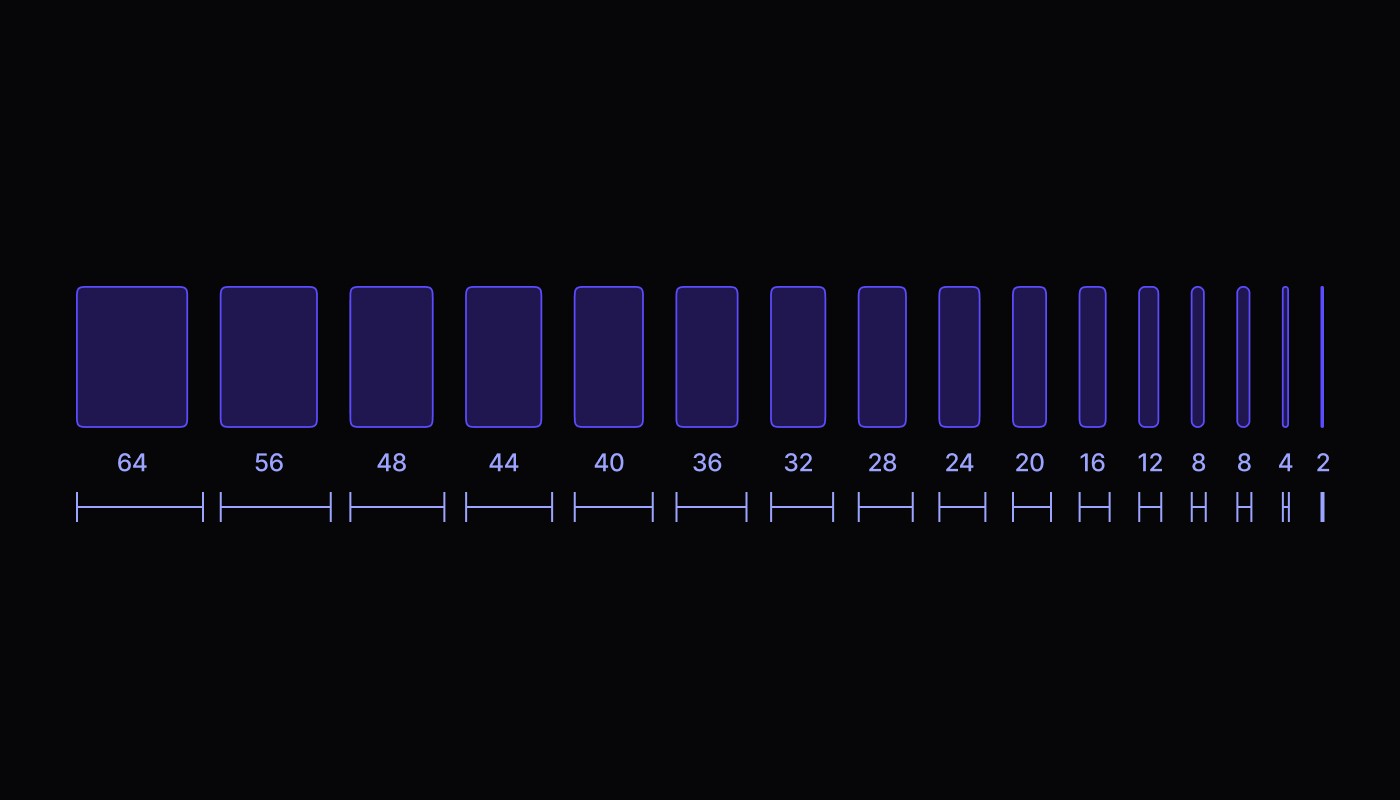
The design system uses pure semantic t-shirt sizing that provides consistent rhythm and hierarchy across all interface elements. **All components and documentation examples use semantic spacing exclusively (p-md, gap-sm, m-lg), with 155+ instances successfully migrated from numeric tokens, ensuring perfect alignment with the Figma design variables.
Spacing Tokens
Semantic t-shirt sizing tokens directly map to Figma variables: Semantic tokens (none, xxs, xs, sm, md, lg, xl, xxl, xxxl, xxxxl). This creates intuitive, design-aligned code where developers think in terms of "small", "medium", "large" rather than pixel values.
Pixel Values
/* PIXEL VALUES REFERENCE */
none = 0px
xxs = 4px
xs = 8px
sm = 12px
md = 16px
lg = 24px
xl = 32px
xxl = 40px
xxxl = 48px
xxxxl = 64px
Semantic Values
/* T-shirt Sizing Spacing Scale (matches Figma variables) */
.semantic-spacing-scale {
  margin: none;           /* 0px - NONE */
  margin: xxs;            /* 4px - XXS */
  margin: xs;             /* 8px - XS */
  margin: sm;             /* 12px - SM */
  margin: md;             /* 16px - MD (base unit) */
  margin: lg;             /* 24px - LG */
  margin: xl;             /* 32px - XL */
  margin: xxl;            /* 40px - XXL */
  margin: xxxl;           /* 48px - XXXL */
  margin: xxxxl;          /* 64px - XXXXL (maximum) */

  padding: none;          /* p-none → 0px */
  padding: xxs;           /* p-xxs → 4px */
  padding: xs;            /* p-xs → 8px */
  padding: sm;            /* p-sm → 12px */
  padding: md;            /* p-md → 16px */
  padding: lg;            /* p-lg → 24px */
  padding: xl;            /* p-xl → 32px */
  padding: xxl;           /* p-xxl → 40px */
  padding: xxxl;          /* p-xxxl → 48px */
  padding: xxxxl;         /* p-xxxxl → 64px */
}
Padding Classes
Control internal spacing within elements
<Card className="p-md">         {/* padding: 16px on all sides */}

// Horizontal padding (left + right)
<Button className="px-sm">      {/* padding-left: 12px, padding-right: 12px */}

// Vertical padding (top + bottom)
<Input className="py-xs">       {/* padding-top: 8px, padding-bottom: 8px */}

// Individual sides
<CardHeader className="pt-lg">  {/* padding-top: 24px */}
<CardContent className="pb-md"> {/* padding-bottom: 16px */}
<FormLabel className="pl-sm">   {/* padding-left: 12px */}
<Badge className="pr-xs">       {/* padding-right: 8px */
Margin Classes
Control external spacing around elements
// All sides margin
<Section className="m-lg">      {/* margin: 24px on all sides */}

// Horizontal margin (left + right)
<Dialog className="mx-xl">      {/* margin-left: 32px, margin-right: 32px */}

// Vertical margin (top + bottom)
<Alert className="my-sm">       {/* margin-top: 12px, margin-bottom: 12px */}

// Individual sides
<Title className="mt-md">       {/* margin-top: 16px */}
<Content className="mb-lg">     {/* margin-bottom: 24px */}
<Icon className="ml-xs">        {/* margin-left: 8px */}
<Text className="mr-sm">        {/* margin-right: 12px */
Gap Classes
Control spacing between child elements in flex/grid layouts
// Flex and grid gap
<View className="gap-sm">       {/* gap: 12px between all children */}
<FormItem className="gap-xs">   {/* gap: 8px between form elements */}

// Directional gaps (when supported)
<View className="gap-x-md">     {/* column-gap: 16px (horizontal spacing) */}
<View className="gap-y-lg">     {/* row-gap: 24px (vertical spacing) */
Spacing Classes
Control spacing between sibling elements
// Vertical spacing between children
<View className="space-y-sm">   {/* margin-top: 12px on all children except first */}
<AlertDialog className="space-y-md"> {/* margin-top: 16px between dialog elements */}

// Horizontal spacing between children
<ButtonGroup className="space-x-xs"> {/* margin-left: 8px on all children except first */
Class Naming Pattern
All spacing utilities follow this pattern: {property}{direction?}-{size}
Prefix | Property | Example |
|---|---|---|
|
| padding: 16px |
|
| margin: 24px |
|
| gap: 12px |
|
| margin-top: 8px |
Direction | Sides Applied | Example |
|---|---|---|
|
| padding-left: 12px, padding-right: 12px |
|
| padding-top: 24px, padding-bottom: 24px |
|
| padding-top: 8px |
|
| padding-bottom: 16px |
|
| padding-left: 12px |
|
| padding-right: 24px |
Examples
// From card.tsx - Complex padding combinations
<Card className="p-lg">              {/* 24px padding all sides */}
  <CardHeader className="pb-xs">     {/* 8px bottom padding */}
    <CardTitle className="mb-sm">Card Title</CardTitle>
  </CardHeader>
  <CardContent className="gap-md">   {/* 16px gap between children */}
    <Text>Content here</Text>
  </CardContent>
</Card>

// From form.tsx - Form spacing patterns
<FormItem className="gap-sm">        {/* 12px gap between form elements */}
  <FormLabel className="mb-xs">Email</FormLabel>
  <Input className="px-sm py-xs" />  {/* 12px horizontal, 8px vertical padding */}
  <FormDescription className="mt-xs"> {/* 8px top margin */}
    Enter your email address
  </FormDescription>
</FormItem>

// From menubar.tsx - Navigation spacing
<MenubarItem className="px-xs py-xs gap-xs"> {/* 8px padding and gap */}
  <Icon className="mr-xs" />         {/* 8px right margin */}
  <Text>Menu Item</Text>
</MenubarItem>
Design Tokens Integration
Access spacing tokens directly in custom CSS
.custom-component {
  padding: var(--space-md);
  margin-bottom: var(--space-lg);
  gap: var(--space-sm);
}

/* Responsive spacing with custom properties */
.responsive-section {
  padding: var(--space-md);
}

@media (min-width: 768px) {
  .responsive-section {
    padding: var(--space-lg);
  }
}
JavaScript Access
// T-shirt sizing spacing constants
const spacing = {
  none: 0,      // NONE
  xxs: 4,       // XXS - Extra Extra Small
  xs: 8,        // XS - Extra Small
  sm: 12,       // SM - Small
  md: 16,       // MD - Medium (base)
  lg: 24,       // LG - Large
  xl: 32,       // XL - Extra Large
  xxl: 40,      // XXL - Extra Extra Large
  xxxl: 48,     // XXXL - Extra Extra Extra Large
  xxxxl: 64,    // XXXXL - Maximum
};

const dynamicSpacing = {
  paddingHorizontal: spacing.md,    // 16px - Medium spacing
  paddingVertical: spacing.sm,      // 12px - Small spacing
  marginBottom: spacing.lg,         // 24px - Large spacing
};

<View style={dynamicSpacing}>
  <Content />
</View>
Accessibility Considerations
Touch Target Spacing
Ensure adequate spacing for accessibility using Tailwind/Nativewind
// Minimum spacing between interactive elements
<View className="space-y-2">    {/* 8px minimum for touch targets */}
  <Button>Action 1</Button>
  <Button>Action 2</Button>
</View>

// Generous spacing for better accessibility
<View className="space-y-4">    {/* 16px for improved usability */}
  <Button>Primary action</Button>
  <Button>Secondary action</Button>
</View>
Usage Best Practices
✅ Do's | Description |
|---|---|
Use consistent spacing | Throughout your application |
Follow the scale | Rather than arbitrary values |
Consider touch targets | On mobile devices |
Test spacing | Across different devices |
❌ Don'ts | Description |
|---|---|
Don't mix scales | Stick to the defined increments |
Avoid excessive nesting | That compounds spacing issues |
Don't ignore platform differences | between web and native |
Auditing Spacing
Regularly audit your spacing usage
# Find arbitrary spacing values
grep -r "m-\[" components/
grep -r "p-\[" components/

# Find spacing patterns
grep -r "className.*p-" components/ | sort | uniq -c
The design system uses pure semantic t-shirt sizing that provides consistent rhythm and hierarchy across all interface elements. **All components and documentation examples use semantic spacing exclusively (p-md, gap-sm, m-lg), with 155+ instances successfully migrated from numeric tokens, ensuring perfect alignment with the Figma design variables.
Spacing Tokens
Semantic t-shirt sizing tokens directly map to Figma variables: Semantic tokens (none, xxs, xs, sm, md, lg, xl, xxl, xxxl, xxxxl). This creates intuitive, design-aligned code where developers think in terms of "small", "medium", "large" rather than pixel values.
Pixel Values
/* PIXEL VALUES REFERENCE */
none = 0px
xxs = 4px
xs = 8px
sm = 12px
md = 16px
lg = 24px
xl = 32px
xxl = 40px
xxxl = 48px
xxxxl = 64px
Semantic Values
/* T-shirt Sizing Spacing Scale (matches Figma variables) */
.semantic-spacing-scale {
  margin: none;           /* 0px - NONE */
  margin: xxs;            /* 4px - XXS */
  margin: xs;             /* 8px - XS */
  margin: sm;             /* 12px - SM */
  margin: md;             /* 16px - MD (base unit) */
  margin: lg;             /* 24px - LG */
  margin: xl;             /* 32px - XL */
  margin: xxl;            /* 40px - XXL */
  margin: xxxl;           /* 48px - XXXL */
  margin: xxxxl;          /* 64px - XXXXL (maximum) */

  padding: none;          /* p-none → 0px */
  padding: xxs;           /* p-xxs → 4px */
  padding: xs;            /* p-xs → 8px */
  padding: sm;            /* p-sm → 12px */
  padding: md;            /* p-md → 16px */
  padding: lg;            /* p-lg → 24px */
  padding: xl;            /* p-xl → 32px */
  padding: xxl;           /* p-xxl → 40px */
  padding: xxxl;          /* p-xxxl → 48px */
  padding: xxxxl;         /* p-xxxxl → 64px */
}
Padding Classes
Control internal spacing within elements
<Card className="p-md">         {/* padding: 16px on all sides */}

// Horizontal padding (left + right)
<Button className="px-sm">      {/* padding-left: 12px, padding-right: 12px */}

// Vertical padding (top + bottom)
<Input className="py-xs">       {/* padding-top: 8px, padding-bottom: 8px */}

// Individual sides
<CardHeader className="pt-lg">  {/* padding-top: 24px */}
<CardContent className="pb-md"> {/* padding-bottom: 16px */}
<FormLabel className="pl-sm">   {/* padding-left: 12px */}
<Badge className="pr-xs">       {/* padding-right: 8px */
Margin Classes
Control external spacing around elements
// All sides margin
<Section className="m-lg">      {/* margin: 24px on all sides */}

// Horizontal margin (left + right)
<Dialog className="mx-xl">      {/* margin-left: 32px, margin-right: 32px */}

// Vertical margin (top + bottom)
<Alert className="my-sm">       {/* margin-top: 12px, margin-bottom: 12px */}

// Individual sides
<Title className="mt-md">       {/* margin-top: 16px */}
<Content className="mb-lg">     {/* margin-bottom: 24px */}
<Icon className="ml-xs">        {/* margin-left: 8px */}
<Text className="mr-sm">        {/* margin-right: 12px */
Gap Classes
Control spacing between child elements in flex/grid layouts
// Flex and grid gap
<View className="gap-sm">       {/* gap: 12px between all children */}
<FormItem className="gap-xs">   {/* gap: 8px between form elements */}

// Directional gaps (when supported)
<View className="gap-x-md">     {/* column-gap: 16px (horizontal spacing) */}
<View className="gap-y-lg">     {/* row-gap: 24px (vertical spacing) */
Spacing Classes
Control spacing between sibling elements
// Vertical spacing between children
<View className="space-y-sm">   {/* margin-top: 12px on all children except first */}
<AlertDialog className="space-y-md"> {/* margin-top: 16px between dialog elements */}

// Horizontal spacing between children
<ButtonGroup className="space-x-xs"> {/* margin-left: 8px on all children except first */
Class Naming Pattern
All spacing utilities follow this pattern: {property}{direction?}-{size}
Prefix | Property | Example |
|---|---|---|
|
| padding: 16px |
|
| margin: 24px |
|
| gap: 12px |
|
| margin-top: 8px |
Direction | Sides Applied | Example |
|---|---|---|
|
| padding-left: 12px, padding-right: 12px |
|
| padding-top: 24px, padding-bottom: 24px |
|
| padding-top: 8px |
|
| padding-bottom: 16px |
|
| padding-left: 12px |
|
| padding-right: 24px |
Examples
// From card.tsx - Complex padding combinations
<Card className="p-lg">              {/* 24px padding all sides */}
  <CardHeader className="pb-xs">     {/* 8px bottom padding */}
    <CardTitle className="mb-sm">Card Title</CardTitle>
  </CardHeader>
  <CardContent className="gap-md">   {/* 16px gap between children */}
    <Text>Content here</Text>
  </CardContent>
</Card>

// From form.tsx - Form spacing patterns
<FormItem className="gap-sm">        {/* 12px gap between form elements */}
  <FormLabel className="mb-xs">Email</FormLabel>
  <Input className="px-sm py-xs" />  {/* 12px horizontal, 8px vertical padding */}
  <FormDescription className="mt-xs"> {/* 8px top margin */}
    Enter your email address
  </FormDescription>
</FormItem>

// From menubar.tsx - Navigation spacing
<MenubarItem className="px-xs py-xs gap-xs"> {/* 8px padding and gap */}
  <Icon className="mr-xs" />         {/* 8px right margin */}
  <Text>Menu Item</Text>
</MenubarItem>
Design Tokens Integration
Access spacing tokens directly in custom CSS
.custom-component {
  padding: var(--space-md);
  margin-bottom: var(--space-lg);
  gap: var(--space-sm);
}

/* Responsive spacing with custom properties */
.responsive-section {
  padding: var(--space-md);
}

@media (min-width: 768px) {
  .responsive-section {
    padding: var(--space-lg);
  }
}
JavaScript Access
// T-shirt sizing spacing constants
const spacing = {
  none: 0,      // NONE
  xxs: 4,       // XXS - Extra Extra Small
  xs: 8,        // XS - Extra Small
  sm: 12,       // SM - Small
  md: 16,       // MD - Medium (base)
  lg: 24,       // LG - Large
  xl: 32,       // XL - Extra Large
  xxl: 40,      // XXL - Extra Extra Large
  xxxl: 48,     // XXXL - Extra Extra Extra Large
  xxxxl: 64,    // XXXXL - Maximum
};

const dynamicSpacing = {
  paddingHorizontal: spacing.md,    // 16px - Medium spacing
  paddingVertical: spacing.sm,      // 12px - Small spacing
  marginBottom: spacing.lg,         // 24px - Large spacing
};

<View style={dynamicSpacing}>
  <Content />
</View>
Accessibility Considerations
Touch Target Spacing
Ensure adequate spacing for accessibility using Tailwind/Nativewind
// Minimum spacing between interactive elements
<View className="space-y-2">    {/* 8px minimum for touch targets */}
  <Button>Action 1</Button>
  <Button>Action 2</Button>
</View>

// Generous spacing for better accessibility
<View className="space-y-4">    {/* 16px for improved usability */}
  <Button>Primary action</Button>
  <Button>Secondary action</Button>
</View>
Usage Best Practices
✅ Do's | Description |
|---|---|
Use consistent spacing | Throughout your application |
Follow the scale | Rather than arbitrary values |
Consider touch targets | On mobile devices |
Test spacing | Across different devices |
❌ Don'ts | Description |
|---|---|
Don't mix scales | Stick to the defined increments |
Avoid excessive nesting | That compounds spacing issues |
Don't ignore platform differences | between web and native |
Auditing Spacing
Regularly audit your spacing usage
# Find arbitrary spacing values
grep -r "m-\[" components/
grep -r "p-\[" components/

# Find spacing patterns
grep -r "className.*p-" components/ | sort | uniq -c
The design system uses pure semantic t-shirt sizing that provides consistent rhythm and hierarchy across all interface elements. **All components and documentation examples use semantic spacing exclusively (p-md, gap-sm, m-lg), with 155+ instances successfully migrated from numeric tokens, ensuring perfect alignment with the Figma design variables.
Spacing Tokens
Semantic t-shirt sizing tokens directly map to Figma variables: Semantic tokens (none, xxs, xs, sm, md, lg, xl, xxl, xxxl, xxxxl). This creates intuitive, design-aligned code where developers think in terms of "small", "medium", "large" rather than pixel values.
Pixel Values
/* PIXEL VALUES REFERENCE */
none = 0px
xxs = 4px
xs = 8px
sm = 12px
md = 16px
lg = 24px
xl = 32px
xxl = 40px
xxxl = 48px
xxxxl = 64px
Semantic Values
/* T-shirt Sizing Spacing Scale (matches Figma variables) */
.semantic-spacing-scale {
  margin: none;           /* 0px - NONE */
  margin: xxs;            /* 4px - XXS */
  margin: xs;             /* 8px - XS */
  margin: sm;             /* 12px - SM */
  margin: md;             /* 16px - MD (base unit) */
  margin: lg;             /* 24px - LG */
  margin: xl;             /* 32px - XL */
  margin: xxl;            /* 40px - XXL */
  margin: xxxl;           /* 48px - XXXL */
  margin: xxxxl;          /* 64px - XXXXL (maximum) */

  padding: none;          /* p-none → 0px */
  padding: xxs;           /* p-xxs → 4px */
  padding: xs;            /* p-xs → 8px */
  padding: sm;            /* p-sm → 12px */
  padding: md;            /* p-md → 16px */
  padding: lg;            /* p-lg → 24px */
  padding: xl;            /* p-xl → 32px */
  padding: xxl;           /* p-xxl → 40px */
  padding: xxxl;          /* p-xxxl → 48px */
  padding: xxxxl;         /* p-xxxxl → 64px */
}
Padding Classes
Control internal spacing within elements
<Card className="p-md">         {/* padding: 16px on all sides */}

// Horizontal padding (left + right)
<Button className="px-sm">      {/* padding-left: 12px, padding-right: 12px */}

// Vertical padding (top + bottom)
<Input className="py-xs">       {/* padding-top: 8px, padding-bottom: 8px */}

// Individual sides
<CardHeader className="pt-lg">  {/* padding-top: 24px */}
<CardContent className="pb-md"> {/* padding-bottom: 16px */}
<FormLabel className="pl-sm">   {/* padding-left: 12px */}
<Badge className="pr-xs">       {/* padding-right: 8px */
Margin Classes
Control external spacing around elements
// All sides margin
<Section className="m-lg">      {/* margin: 24px on all sides */}

// Horizontal margin (left + right)
<Dialog className="mx-xl">      {/* margin-left: 32px, margin-right: 32px */}

// Vertical margin (top + bottom)
<Alert className="my-sm">       {/* margin-top: 12px, margin-bottom: 12px */}

// Individual sides
<Title className="mt-md">       {/* margin-top: 16px */}
<Content className="mb-lg">     {/* margin-bottom: 24px */}
<Icon className="ml-xs">        {/* margin-left: 8px */}
<Text className="mr-sm">        {/* margin-right: 12px */
Gap Classes
Control spacing between child elements in flex/grid layouts
// Flex and grid gap
<View className="gap-sm">       {/* gap: 12px between all children */}
<FormItem className="gap-xs">   {/* gap: 8px between form elements */}

// Directional gaps (when supported)
<View className="gap-x-md">     {/* column-gap: 16px (horizontal spacing) */}
<View className="gap-y-lg">     {/* row-gap: 24px (vertical spacing) */
Spacing Classes
Control spacing between sibling elements
// Vertical spacing between children
<View className="space-y-sm">   {/* margin-top: 12px on all children except first */}
<AlertDialog className="space-y-md"> {/* margin-top: 16px between dialog elements */}

// Horizontal spacing between children
<ButtonGroup className="space-x-xs"> {/* margin-left: 8px on all children except first */
Class Naming Pattern
All spacing utilities follow this pattern: {property}{direction?}-{size}
Prefix | Property | Example |
|---|---|---|
|
| padding: 16px |
|
| margin: 24px |
|
| gap: 12px |
|
| margin-top: 8px |
Direction | Sides Applied | Example |
|---|---|---|
|
| padding-left: 12px, padding-right: 12px |
|
| padding-top: 24px, padding-bottom: 24px |
|
| padding-top: 8px |
|
| padding-bottom: 16px |
|
| padding-left: 12px |
|
| padding-right: 24px |
Examples
// From card.tsx - Complex padding combinations
<Card className="p-lg">              {/* 24px padding all sides */}
  <CardHeader className="pb-xs">     {/* 8px bottom padding */}
    <CardTitle className="mb-sm">Card Title</CardTitle>
  </CardHeader>
  <CardContent className="gap-md">   {/* 16px gap between children */}
    <Text>Content here</Text>
  </CardContent>
</Card>

// From form.tsx - Form spacing patterns
<FormItem className="gap-sm">        {/* 12px gap between form elements */}
  <FormLabel className="mb-xs">Email</FormLabel>
  <Input className="px-sm py-xs" />  {/* 12px horizontal, 8px vertical padding */}
  <FormDescription className="mt-xs"> {/* 8px top margin */}
    Enter your email address
  </FormDescription>
</FormItem>

// From menubar.tsx - Navigation spacing
<MenubarItem className="px-xs py-xs gap-xs"> {/* 8px padding and gap */}
  <Icon className="mr-xs" />         {/* 8px right margin */}
  <Text>Menu Item</Text>
</MenubarItem>
Design Tokens Integration
Access spacing tokens directly in custom CSS
.custom-component {
  padding: var(--space-md);
  margin-bottom: var(--space-lg);
  gap: var(--space-sm);
}

/* Responsive spacing with custom properties */
.responsive-section {
  padding: var(--space-md);
}

@media (min-width: 768px) {
  .responsive-section {
    padding: var(--space-lg);
  }
}
JavaScript Access
// T-shirt sizing spacing constants
const spacing = {
  none: 0,      // NONE
  xxs: 4,       // XXS - Extra Extra Small
  xs: 8,        // XS - Extra Small
  sm: 12,       // SM - Small
  md: 16,       // MD - Medium (base)
  lg: 24,       // LG - Large
  xl: 32,       // XL - Extra Large
  xxl: 40,      // XXL - Extra Extra Large
  xxxl: 48,     // XXXL - Extra Extra Extra Large
  xxxxl: 64,    // XXXXL - Maximum
};

const dynamicSpacing = {
  paddingHorizontal: spacing.md,    // 16px - Medium spacing
  paddingVertical: spacing.sm,      // 12px - Small spacing
  marginBottom: spacing.lg,         // 24px - Large spacing
};

<View style={dynamicSpacing}>
  <Content />
</View>
Accessibility Considerations
Touch Target Spacing
Ensure adequate spacing for accessibility using Tailwind/Nativewind
// Minimum spacing between interactive elements
<View className="space-y-2">    {/* 8px minimum for touch targets */}
  <Button>Action 1</Button>
  <Button>Action 2</Button>
</View>

// Generous spacing for better accessibility
<View className="space-y-4">    {/* 16px for improved usability */}
  <Button>Primary action</Button>
  <Button>Secondary action</Button>
</View>
Usage Best Practices
✅ Do's | Description |
|---|---|
Use consistent spacing | Throughout your application |
Follow the scale | Rather than arbitrary values |
Consider touch targets | On mobile devices |
Test spacing | Across different devices |
❌ Don'ts | Description |
|---|---|
Don't mix scales | Stick to the defined increments |
Avoid excessive nesting | That compounds spacing issues |
Don't ignore platform differences | between web and native |
Auditing Spacing
Regularly audit your spacing usage
# Find arbitrary spacing values
grep -r "m-\[" components/
grep -r "p-\[" components/

# Find spacing patterns
grep -r "className.*p-" components/ | sort | uniq -c
Continue reading
Get in touch
Got a project in mind? Let’s chat. I’m always keen to hear about new ideas, collaborations, or challenges you’re looking to solve. Drop me a message and we can explore how to bring your vision to life together.
Get in touch
Got a project in mind? Let’s chat. I’m always keen to hear about new ideas, collaborations, or challenges you’re looking to solve. Drop me a message and we can explore how to bring your vision to life together.
Get in touch
Got a project in mind? Let’s chat. I’m always keen to hear about new ideas, collaborations, or challenges you’re looking to solve. Drop me a message and we can explore how to bring your vision to life together.