
Search…
Search…
Phone Input
Live in Codebase
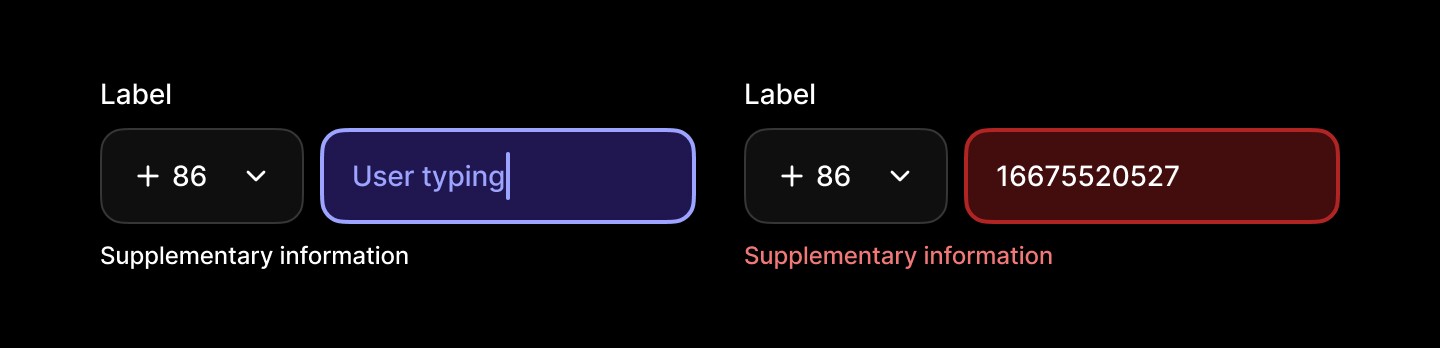
Phone inputs allow people to enter and edit phone information. They should be clearly labelled, provide helpful placeholders or hints where needed.
AA
WCAG 2.1 accessibility compliant
Phone Input
Live in Codebase
Phone inputs allow people to enter and edit phone information. They should be clearly labelled, provide helpful placeholders or hints where needed.
AA
WCAG 2.1 accessibility compliant
Phone Input
Phone inputs allow people to enter and edit phone information. They should be clearly labelled, provide helpful placeholders or hints where needed.
Figma Designs

Figma Designs
Figma Designs
When to use | When not to use |
|---|---|
✅ Use for short text input fields | ⛔️ Use for long-form text |
✅ Provide help text and placeholder text for non-critical guidance | ⛔️ Rely on placeholder text for required information, use hint text for that purpose |
✅Validate input once the user has finished interacting, not before |
Anatomy
The phone input includes a label, an input field with a country code selector, and supplementary text for validation or guidance. The label defines the expected input, while the field captures numeric values with optional placeholder text.

Element | Description |
|---|---|
| Text Input label |
| Text Input status message |
| Text Input value |
Spacing
Consistent spacing keeps the label, selector, field, and supplementary text clear and balanced. Internal padding supports comfortable entry, while margins maintain separation from other elements.

States
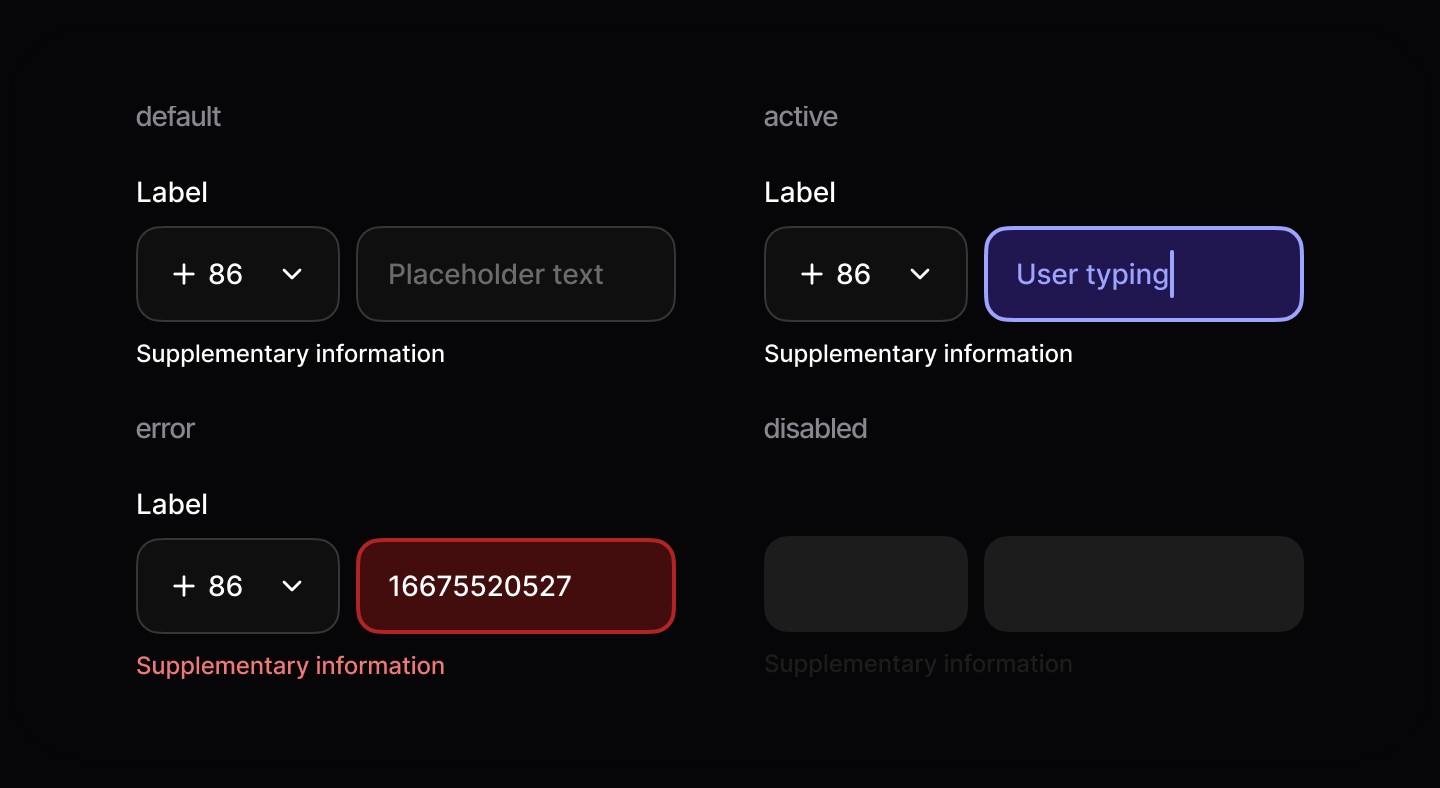
Phone inputs have four states: default, active, error, and disabled, each providing clear visual feedback for different interaction scenarios.
When to use | When not to use |
|---|---|
✅ Use for short text input fields | ⛔️ Use for long-form text |
✅ Provide help text and placeholder text for non-critical guidance | ⛔️ Rely on placeholder text for required information, use hint text for that purpose |
✅Validate input once the user has finished interacting, not before |
Anatomy
The phone input includes a label, an input field with a country code selector, and supplementary text for validation or guidance. The label defines the expected input, while the field captures numeric values with optional placeholder text.
Element | Description |
|---|---|
| Text Input label |
| Text Input status message |
| Text Input value |
Spacing
Consistent spacing keeps the label, selector, field, and supplementary text clear and balanced. Internal padding supports comfortable entry, while margins maintain separation from other elements.
States
Phone inputs have four states: default, active, error, and disabled, each providing clear visual feedback for different interaction scenarios.
When to use | When not to use |
|---|---|
✅ Use for short text input fields | ⛔️ Use for long-form text |
✅ Provide help text and placeholder text for non-critical guidance | ⛔️ Rely on placeholder text for required information, use hint text for that purpose |
✅Validate input once the user has finished interacting, not before |
Anatomy
The phone input includes a label, an input field with a country code selector, and supplementary text for validation or guidance. The label defines the expected input, while the field captures numeric values with optional placeholder text.
Element | Description |
|---|---|
| Text Input label |
| Text Input status message |
| Text Input value |
Spacing
Consistent spacing keeps the label, selector, field, and supplementary text clear and balanced. Internal padding supports comfortable entry, while margins maintain separation from other elements.
States
Phone inputs have four states: default, active, error, and disabled, each providing clear visual feedback for different interaction scenarios.
Continue reading
Get in touch
Got a project in mind? Let’s chat. I’m always keen to hear about new ideas, collaborations, or challenges you’re looking to solve. Drop me a message and we can explore how to bring your vision to life together.
Get in touch
Got a project in mind? Let’s chat. I’m always keen to hear about new ideas, collaborations, or challenges you’re looking to solve. Drop me a message and we can explore how to bring your vision to life together.
Get in touch
Got a project in mind? Let’s chat. I’m always keen to hear about new ideas, collaborations, or challenges you’re looking to solve. Drop me a message and we can explore how to bring your vision to life together.