
Search…
Search…
Illustration
Live in Codebase
The Illustration component displays artwork in multiple sizes, adding visual interest and context to empty states, onboarding experiences, and feature explanations.
AA
WCAG 2.1 accessibility compliant
Illustration
Live in Codebase
The Illustration component displays artwork in multiple sizes, adding visual interest and context to empty states, onboarding experiences, and feature explanations.
AA
WCAG 2.1 accessibility compliant
Illustration
The Illustration component displays artwork in multiple sizes, adding visual interest and context to empty states, onboarding experiences, and feature explanations.
View Figma Designs

View Figma Designs
View Figma Designs

DS-Illustration Component Sizes
• Small: 80px × 80px
• Medium: 120px × 120px (default)
• Large: 160px × 160px
All illustrations maintain a 1:1 aspect ratio (square) and use object-fit: contain to
preserve the original aspect ratio of the image within the container.
When to use | When not to use |
|---|---|
✅ Use illustrations to support meaning, add context, and reinforce brand personality. | ⛔️ Use illustrations as decoration only or when they distract from core content. |
Gallery
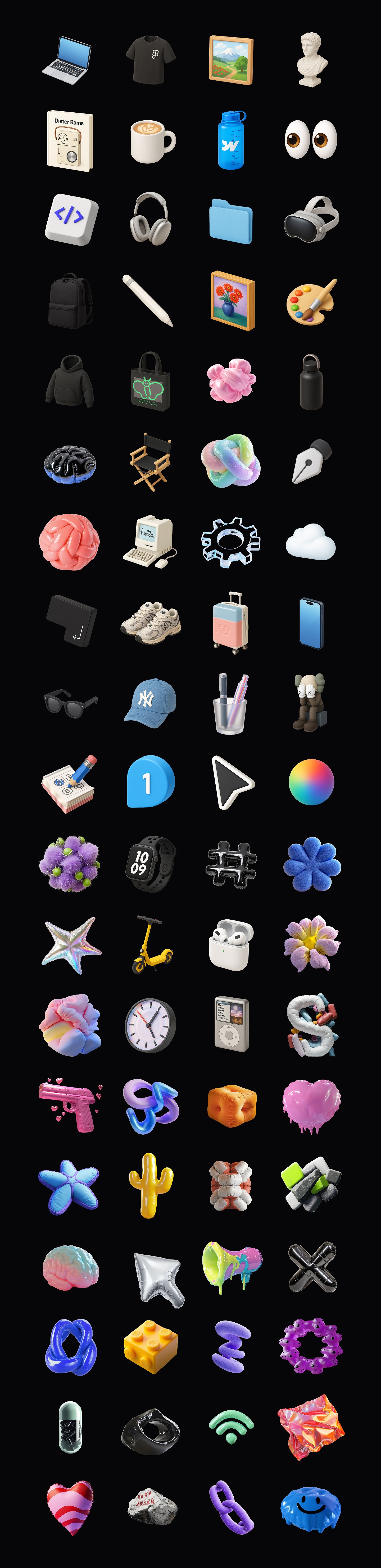
A comprehensive gallery of all available illustrations in the design system. Each illustration can be used by passing the name prop to the DsIllustration component. All illustrations are displayed at small size for overview purposes.
DS-Illustration Component Sizes
• Small: 80px × 80px
• Medium: 120px × 120px (default)
• Large: 160px × 160px
All illustrations maintain a 1:1 aspect ratio (square) and use object-fit: contain to
preserve the original aspect ratio of the image within the container.
When to use | When not to use |
|---|---|
✅ Use illustrations to support meaning, add context, and reinforce brand personality. | ⛔️ Use illustrations as decoration only or when they distract from core content. |
Gallery
A comprehensive gallery of all available illustrations in the design system. Each illustration can be used by passing the name prop to the DsIllustration component. All illustrations are displayed at small size for overview purposes.
DS-Illustration Component Sizes
• Small: 80px × 80px
• Medium: 120px × 120px (default)
• Large: 160px × 160px
All illustrations maintain a 1:1 aspect ratio (square) and use object-fit: contain to
preserve the original aspect ratio of the image within the container.
When to use | When not to use |
|---|---|
✅ Use illustrations to support meaning, add context, and reinforce brand personality. | ⛔️ Use illustrations as decoration only or when they distract from core content. |
Gallery
A comprehensive gallery of all available illustrations in the design system. Each illustration can be used by passing the name prop to the DsIllustration component. All illustrations are displayed at small size for overview purposes.
Continue reading
Get in touch
Got a project in mind? Let’s chat. I’m always keen to hear about new ideas, collaborations, or challenges you’re looking to solve. Drop me a message and we can explore how to bring your vision to life together.
Get in touch
Got a project in mind? Let’s chat. I’m always keen to hear about new ideas, collaborations, or challenges you’re looking to solve. Drop me a message and we can explore how to bring your vision to life together.
Get in touch
Got a project in mind? Let’s chat. I’m always keen to hear about new ideas, collaborations, or challenges you’re looking to solve. Drop me a message and we can explore how to bring your vision to life together.