
Search…
Search…
Hover Card
Live in Codebase
A hover card is a lightweight UI element that appears when a user hovers over an item, providing quick access to supplementary information or actions without leaving the current view. It’s often used for user profiles, previews, or contextual details, helping reduce navigation friction while keeping the interface clean and responsive.
AA
WCAG 2.1 accessibility compliant
Hover Card
Live in Codebase
A hover card is a lightweight UI element that appears when a user hovers over an item, providing quick access to supplementary information or actions without leaving the current view. It’s often used for user profiles, previews, or contextual details, helping reduce navigation friction while keeping the interface clean and responsive.
AA
WCAG 2.1 accessibility compliant
Hover Card
A hover card is a lightweight UI element that appears when a user hovers over an item, providing quick access to supplementary information or actions without leaving the current view. It’s often used for user profiles, previews, or contextual details, helping reduce navigation friction while keeping the interface clean and responsive.
View Figma Designs

View Figma Designs
View Figma Designs

When to use | When not to use |
|---|---|
✅ Use dropdown menus for 5–10 options, typically for navigation or command actions. | ⛔️ Don’t use dropdowns for form inputs. use Select or Input components instead. |
✅ Order items logically, placing the most common options first.. | ⛔️ Avoid hiding primary actions inside a dropdown; they should remain visible. |
Anatomy
The Hover Card displays key user details in a compact preview. It includes an avatar, label, optional expand button, and shortcut command, giving users quick context without leaving their current view.
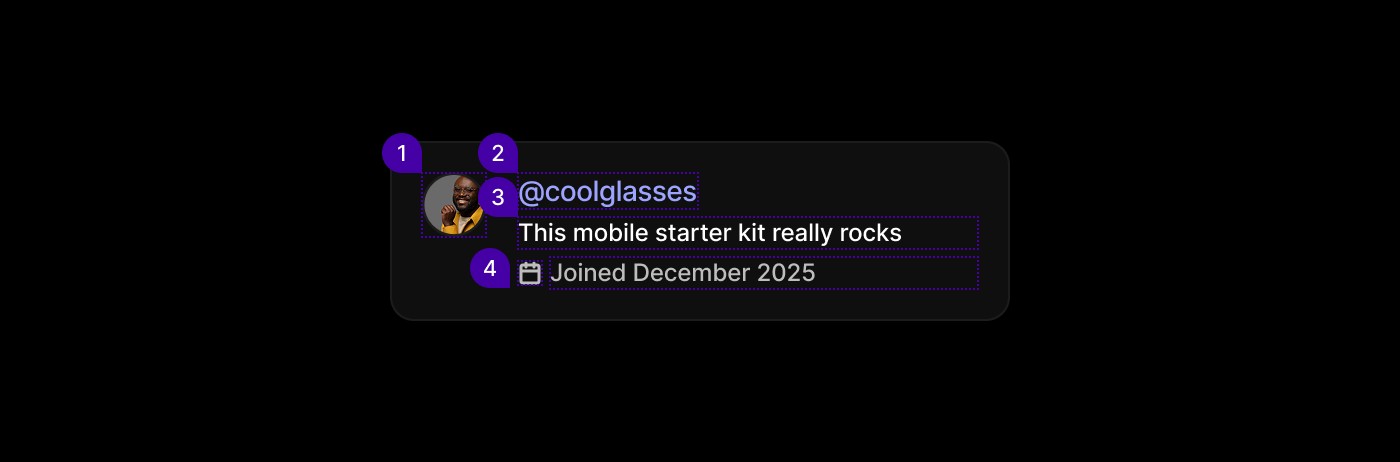
Element | Description |
|---|---|
| Avatar Component |
| Text |
| Lucide Icon chevron |
| Lucide Icon calendar, Text |
Spacing
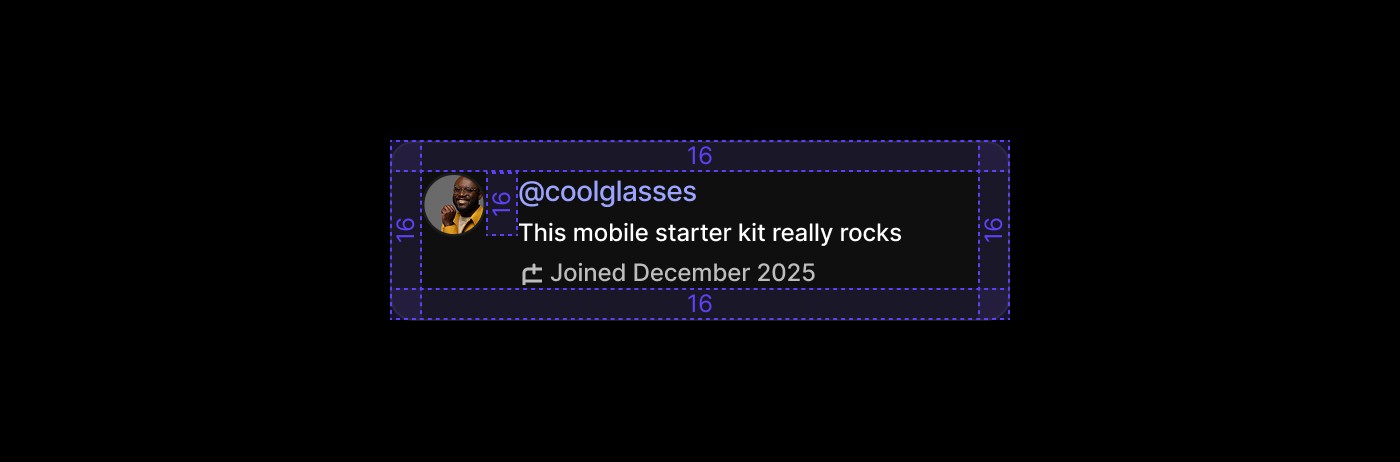
Consistent 16px padding keeps the layout clear and balanced. Even spacing between the avatar, labels, and shortcuts ensures readability, accessibility, and a compact visual structure.
When to use | When not to use |
|---|---|
✅ Use dropdown menus for 5–10 options, typically for navigation or command actions. | ⛔️ Don’t use dropdowns for form inputs. use Select or Input components instead. |
✅ Order items logically, placing the most common options first.. | ⛔️ Avoid hiding primary actions inside a dropdown; they should remain visible. |
Anatomy
The Hover Card displays key user details in a compact preview. It includes an avatar, label, optional expand button, and shortcut command, giving users quick context without leaving their current view.
Element | Description |
|---|---|
| Avatar Component |
| Text |
| Lucide Icon chevron |
| Lucide Icon calendar, Text |
Spacing
Consistent 16px padding keeps the layout clear and balanced. Even spacing between the avatar, labels, and shortcuts ensures readability, accessibility, and a compact visual structure.
When to use | When not to use |
|---|---|
✅ Use dropdown menus for 5–10 options, typically for navigation or command actions. | ⛔️ Don’t use dropdowns for form inputs. use Select or Input components instead. |
✅ Order items logically, placing the most common options first.. | ⛔️ Avoid hiding primary actions inside a dropdown; they should remain visible. |
Anatomy
The Hover Card displays key user details in a compact preview. It includes an avatar, label, optional expand button, and shortcut command, giving users quick context without leaving their current view.
Element | Description |
|---|---|
| Avatar Component |
| Text |
| Lucide Icon chevron |
| Lucide Icon calendar, Text |
Spacing
Consistent 16px padding keeps the layout clear and balanced. Even spacing between the avatar, labels, and shortcuts ensures readability, accessibility, and a compact visual structure.
Continue reading
Get in touch
Got a project in mind? Let’s chat. I’m always keen to hear about new ideas, collaborations, or challenges you’re looking to solve. Drop me a message and we can explore how to bring your vision to life together.
Get in touch
Got a project in mind? Let’s chat. I’m always keen to hear about new ideas, collaborations, or challenges you’re looking to solve. Drop me a message and we can explore how to bring your vision to life together.
Get in touch
Got a project in mind? Let’s chat. I’m always keen to hear about new ideas, collaborations, or challenges you’re looking to solve. Drop me a message and we can explore how to bring your vision to life together.