
Search…
Search…
Dropdown
Live in Codebase
A dropdown menu displays a compact list of options that expand from a trigger element, helping users choose or navigate efficiently while keeping the interface clean and accessible.
AA
WCAG 2.1 accessibility compliant
Dropdown
Live in Codebase
A dropdown menu displays a compact list of options that expand from a trigger element, helping users choose or navigate efficiently while keeping the interface clean and accessible.
AA
WCAG 2.1 accessibility compliant
Dropdown
A dropdown menu displays a compact list of options that expand from a trigger element, helping users choose or navigate efficiently while keeping the interface clean and accessible.
View Figma Designs

View Figma Designs
View Figma Designs

When to use | When not to use |
|---|---|
✅ Use dropdown menus for 5–10 options, typically for navigation or command actions. | ⛔️ Don’t use dropdowns for form inputs. use Select or Input components instead. |
✅ Order items logically, placing the most common options first.. | ⛔️ Avoid hiding primary actions inside a dropdown; they should remain visible. |
Anatomy
The dropdown menu includes four key elements for clear navigation. Each item features a leading icon, a label, and, if expandable, a chevron indicator for submenus. Keyboard shortcuts can appear on frequent actions, helping users scan and act quickly.
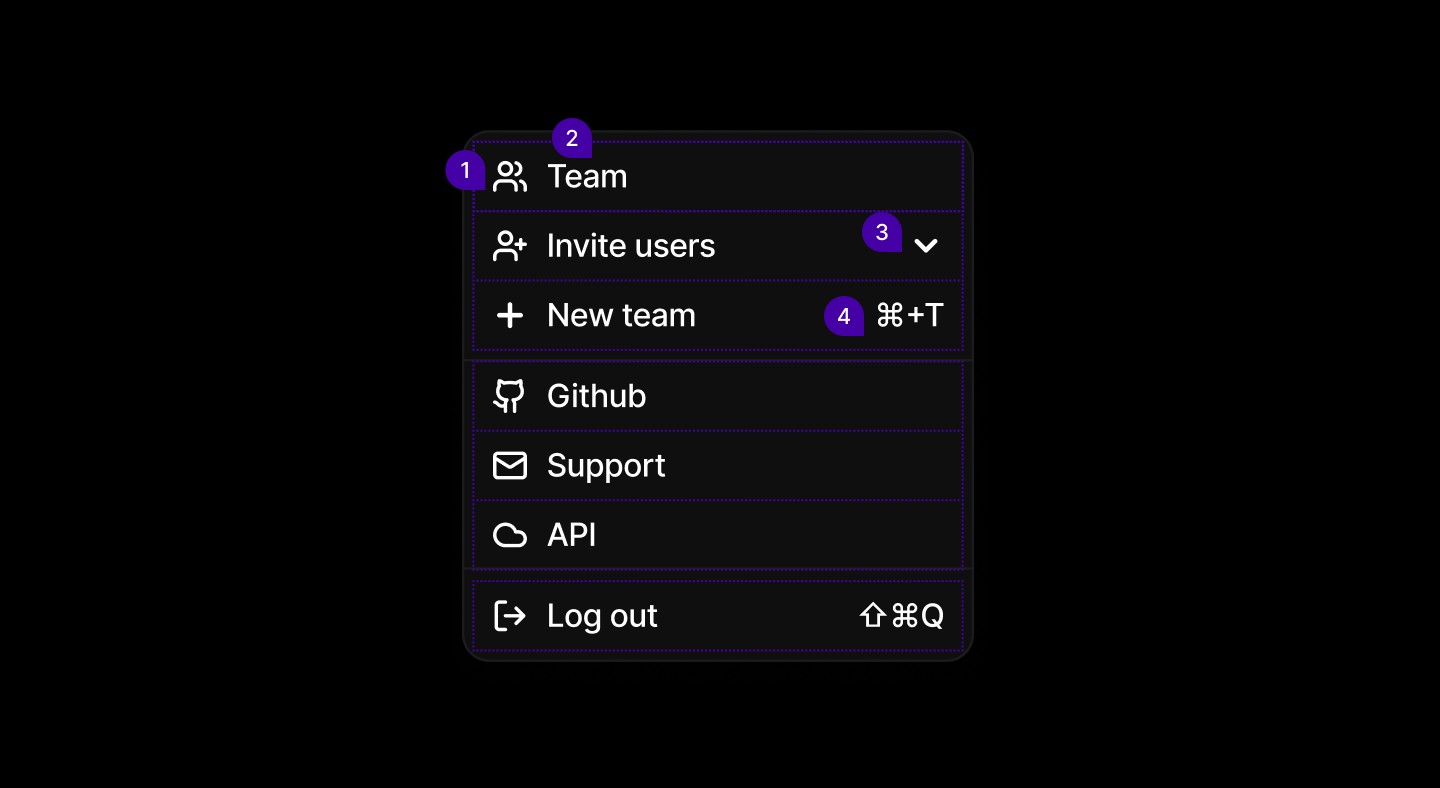
Element | Description |
|---|---|
| Lucide Icon users |
| Text |
| Lucide Icon chevron |
| Text |
Spacing
Consistent padding and margins keep the menu readable and touch-friendly. Spacing around icons, labels, and shortcuts maintains clarity and separation between sections, ensuring a compact, well-organized layout across devices.

When to use | When not to use |
|---|---|
✅ Use dropdown menus for 5–10 options, typically for navigation or command actions. | ⛔️ Don’t use dropdowns for form inputs. use Select or Input components instead. |
✅ Order items logically, placing the most common options first.. | ⛔️ Avoid hiding primary actions inside a dropdown; they should remain visible. |
Anatomy
The dropdown menu includes four key elements for clear navigation. Each item features a leading icon, a label, and, if expandable, a chevron indicator for submenus. Keyboard shortcuts can appear on frequent actions, helping users scan and act quickly.
Element | Description |
|---|---|
| Lucide Icon users |
| Text |
| Lucide Icon chevron |
| Text |
Spacing
Consistent padding and margins keep the menu readable and touch-friendly. Spacing around icons, labels, and shortcuts maintains clarity and separation between sections, ensuring a compact, well-organized layout across devices.
When to use | When not to use |
|---|---|
✅ Use dropdown menus for 5–10 options, typically for navigation or command actions. | ⛔️ Don’t use dropdowns for form inputs. use Select or Input components instead. |
✅ Order items logically, placing the most common options first.. | ⛔️ Avoid hiding primary actions inside a dropdown; they should remain visible. |
Anatomy
The dropdown menu includes four key elements for clear navigation. Each item features a leading icon, a label, and, if expandable, a chevron indicator for submenus. Keyboard shortcuts can appear on frequent actions, helping users scan and act quickly.
Element | Description |
|---|---|
| Lucide Icon users |
| Text |
| Lucide Icon chevron |
| Text |
Spacing
Consistent padding and margins keep the menu readable and touch-friendly. Spacing around icons, labels, and shortcuts maintains clarity and separation between sections, ensuring a compact, well-organized layout across devices.
Continue reading
Get in touch
Got a project in mind? Let’s chat. I’m always keen to hear about new ideas, collaborations, or challenges you’re looking to solve. Drop me a message and we can explore how to bring your vision to life together.
Get in touch
Got a project in mind? Let’s chat. I’m always keen to hear about new ideas, collaborations, or challenges you’re looking to solve. Drop me a message and we can explore how to bring your vision to life together.
Get in touch
Got a project in mind? Let’s chat. I’m always keen to hear about new ideas, collaborations, or challenges you’re looking to solve. Drop me a message and we can explore how to bring your vision to life together.