
Search…
Search…
Text Area
Live in Codebase
A text area lets users enter multi-line text, ideal for comments or longer inputs. It should include clear labels, placeholders, and accessible focus states for easy, readable input.
AA
WCAG 2.1 accessibility compliant
Text Area
Live in Codebase
A text area lets users enter multi-line text, ideal for comments or longer inputs. It should include clear labels, placeholders, and accessible focus states for easy, readable input.
AA
WCAG 2.1 accessibility compliant
Text Area
A text area lets users enter multi-line text, ideal for comments or longer inputs. It should include clear labels, placeholders, and accessible focus states for easy, readable input.
View Figma Designs

View Figma Designs
View Figma Designs
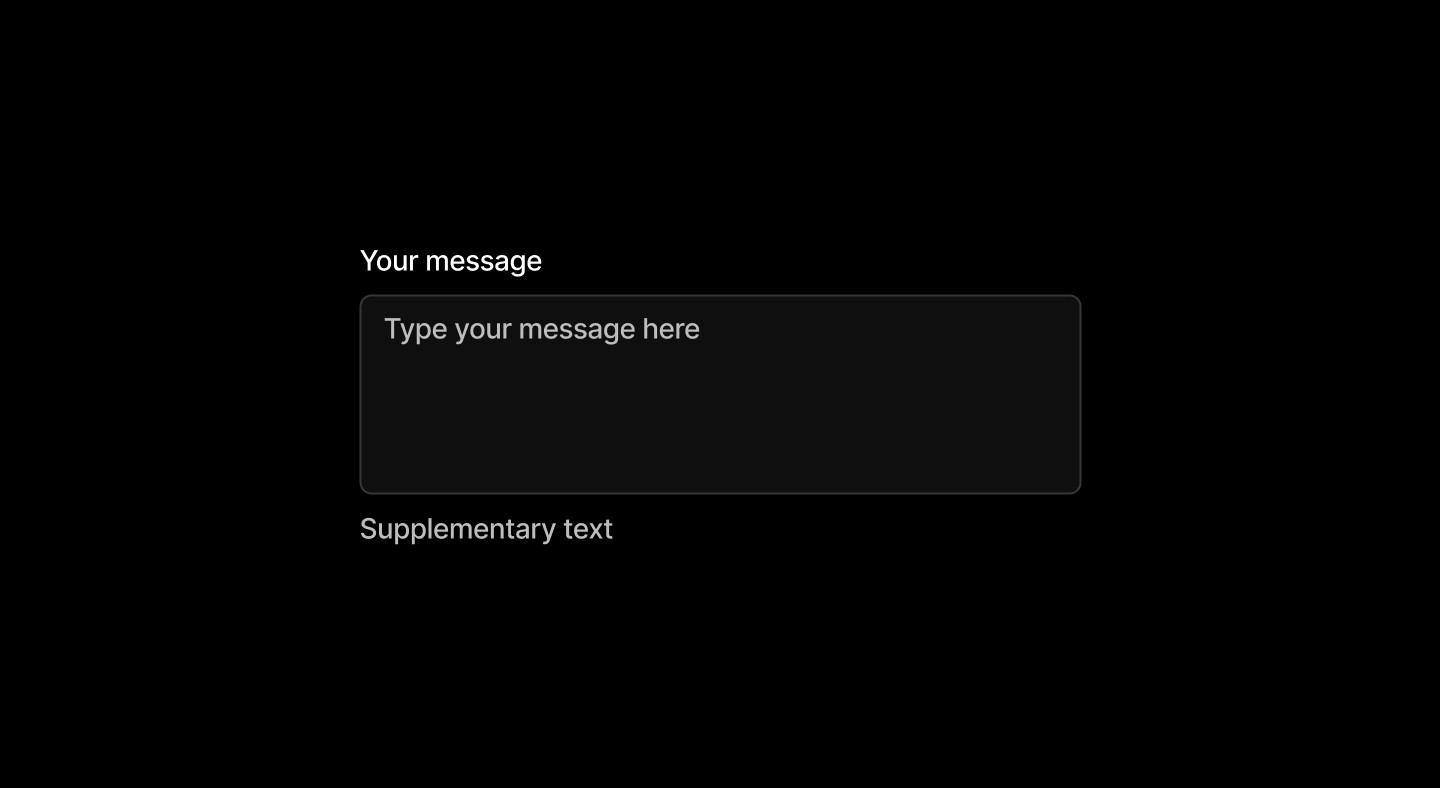
Multi-line text input with auto-sizing and cross-platform accessibility support.
When to use | When not to use |
|---|---|
✅ Use to allow text input where the expected input is long. | ⛔️ Don’t use when the expected text input is short. Use input component instead. |
Anatomy
The text area includes a label, a multi-line input field, and supplementary text for guidance or validation. This structure provides clear context and space for longer inputs like comments or descriptions.
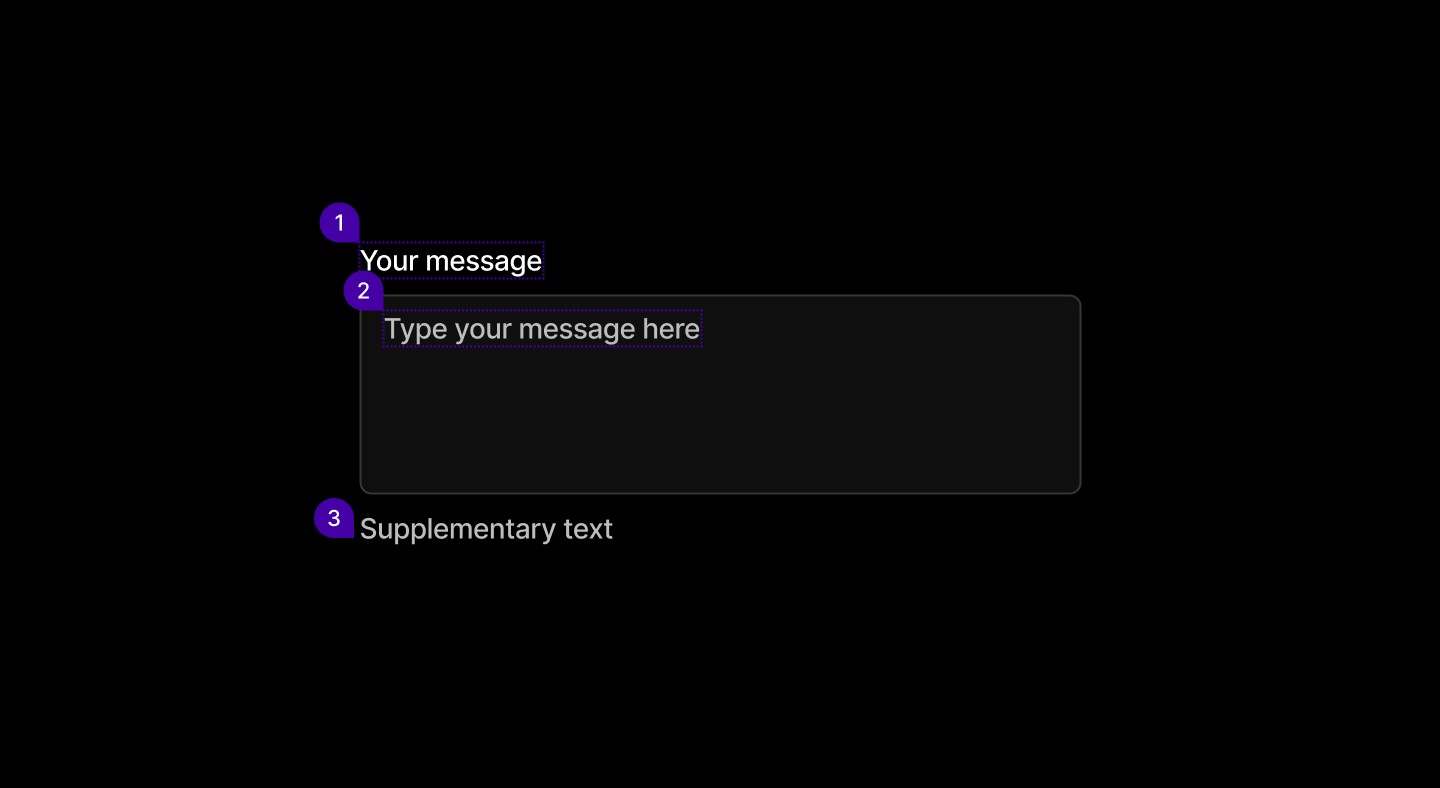
Element | Description |
|---|---|
| Text |
| Text input area |
| Help text |
States
Text areas offer clear feedback across states: default for idle, focused with highlighted borders, and error with red styling and messages to flag issues.

Spacing
Padding of 8px top and bottom and 12px left and right. Spacing between the label, field, and helper text ensures clarity and a balanced layout within forms.

Multi-line text input with auto-sizing and cross-platform accessibility support.
When to use | When not to use |
|---|---|
✅ Use to allow text input where the expected input is long. | ⛔️ Don’t use when the expected text input is short. Use input component instead. |
Anatomy
The text area includes a label, a multi-line input field, and supplementary text for guidance or validation. This structure provides clear context and space for longer inputs like comments or descriptions.
Element | Description |
|---|---|
| Text |
| Text input area |
| Help text |
States
Text areas offer clear feedback across states: default for idle, focused with highlighted borders, and error with red styling and messages to flag issues.
Spacing
Padding of 8px top and bottom and 12px left and right. Spacing between the label, field, and helper text ensures clarity and a balanced layout within forms.
Multi-line text input with auto-sizing and cross-platform accessibility support.
When to use | When not to use |
|---|---|
✅ Use to allow text input where the expected input is long. | ⛔️ Don’t use when the expected text input is short. Use input component instead. |
Anatomy
The text area includes a label, a multi-line input field, and supplementary text for guidance or validation. This structure provides clear context and space for longer inputs like comments or descriptions.
Element | Description |
|---|---|
| Text |
| Text input area |
| Help text |
States
Text areas offer clear feedback across states: default for idle, focused with highlighted borders, and error with red styling and messages to flag issues.
Spacing
Padding of 8px top and bottom and 12px left and right. Spacing between the label, field, and helper text ensures clarity and a balanced layout within forms.
Continue reading
Get in touch
Got a project in mind? Let’s chat. I’m always keen to hear about new ideas, collaborations, or challenges you’re looking to solve. Drop me a message and we can explore how to bring your vision to life together.
Get in touch
Got a project in mind? Let’s chat. I’m always keen to hear about new ideas, collaborations, or challenges you’re looking to solve. Drop me a message and we can explore how to bring your vision to life together.
Get in touch
Got a project in mind? Let’s chat. I’m always keen to hear about new ideas, collaborations, or challenges you’re looking to solve. Drop me a message and we can explore how to bring your vision to life together.