
Search…
Search…
Avatars
Live in Codebase
Avatars are visual representations of users, typically displayed as profile images or icons. They provide a quick way to identify people within an interface, from comments and chat to dashboards and contact lists.
AA
WCAG 2.1 accessibility compliant
Avatars
Live in Codebase
Avatars are visual representations of users, typically displayed as profile images or icons. They provide a quick way to identify people within an interface, from comments and chat to dashboards and contact lists.
AA
WCAG 2.1 accessibility compliant
Avatars
Avatars are visual representations of users, typically displayed as profile images or icons. They provide a quick way to identify people within an interface, from comments and chat to dashboards and contact lists.
Figma Designs

Figma Designs
Figma Designs
By using avatars, you give users a clear and recognisable way to identify people or profiles at a glance, reducing cognitive load and making navigation more intuitive. When designed thoughtfully, avatars enhance the interface by adding visual context without overwhelming or distracting from the core content.
Do | Don't |
|---|---|
✅ Use a clear image to ensure clarity | ⛔️ Use an image that is distorted/blurred |
✅ Upload images @2x | ⛔️ Upload images @1x |
Sizes
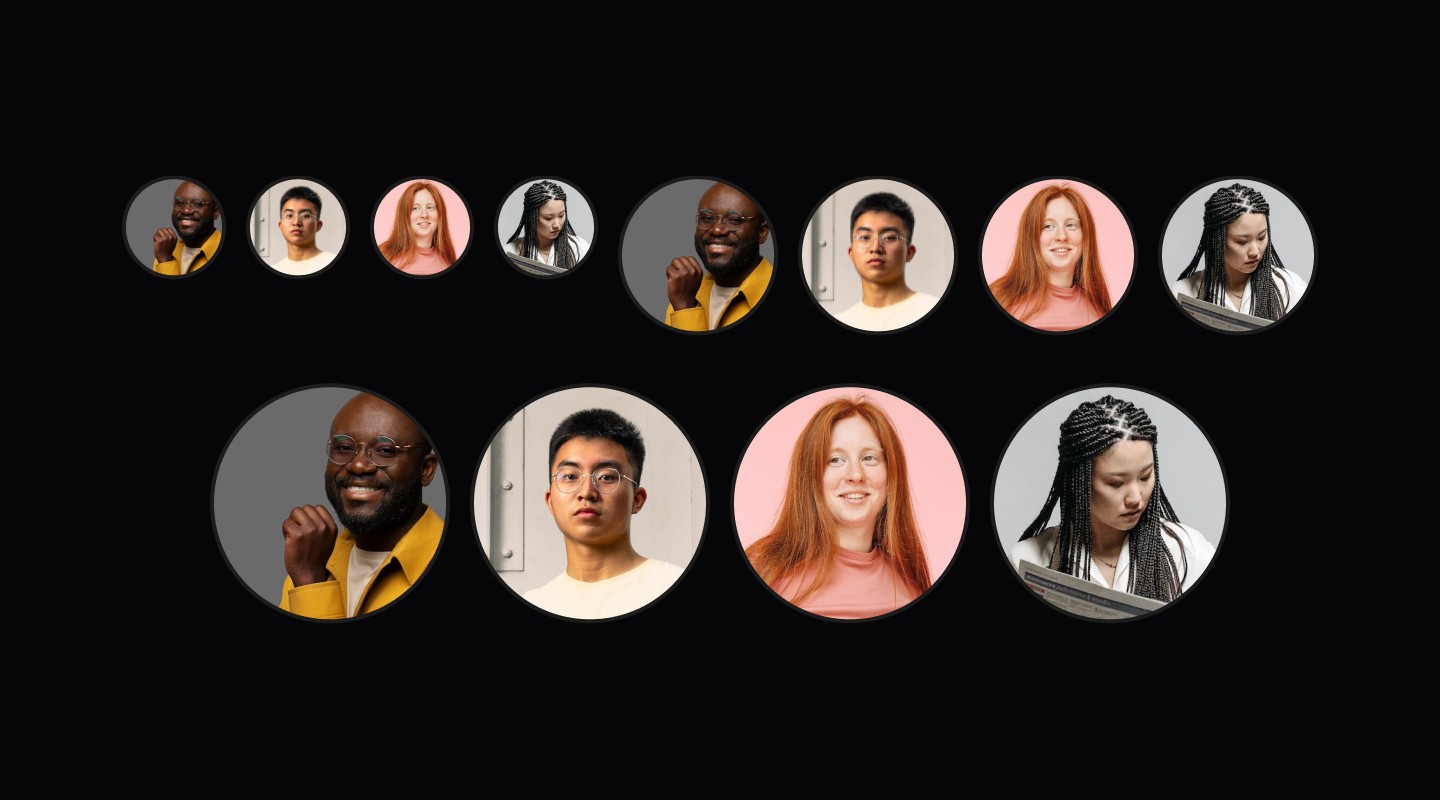
Covers four sizes: 32px, 52px, 80px and 120px. Each scales proportionally for different contexts, small for compact areas, medium for standard use, and large for primary actions or touch-friendly layouts.

border-sm (1px) - 32px avatar border width, border-md (2px) - 52px, 80px, 120px avatar border width.
Size Specs
Size | Dimension | Border Width | Use Case |
|---|---|---|---|
32px | 32x32px | 1px | Small lists, compact UI |
52px | 52x52px | 2px | Standard lists, cards |
80px | 80x80px | 2px | Profile cards, emphasis |
120px | 120x120px | 2px | Large profiles, hero sections |
By using avatars, you give users a clear and recognisable way to identify people or profiles at a glance, reducing cognitive load and making navigation more intuitive. When designed thoughtfully, avatars enhance the interface by adding visual context without overwhelming or distracting from the core content.
Do | Don't |
|---|---|
✅ Use a clear image to ensure clarity | ⛔️ Use an image that is distorted/blurred |
✅ Upload images @2x | ⛔️ Upload images @1x |
Sizes
Covers four sizes: 32px, 52px, 80px and 120px. Each scales proportionally for different contexts, small for compact areas, medium for standard use, and large for primary actions or touch-friendly layouts.
border-sm (1px) - 32px avatar border width, border-md (2px) - 52px, 80px, 120px avatar border width.
Size Specs
Size | Dimension | Border Width | Use Case |
|---|---|---|---|
32px | 32x32px | 1px | Small lists, compact UI |
52px | 52x52px | 2px | Standard lists, cards |
80px | 80x80px | 2px | Profile cards, emphasis |
120px | 120x120px | 2px | Large profiles, hero sections |
By using avatars, you give users a clear and recognisable way to identify people or profiles at a glance, reducing cognitive load and making navigation more intuitive. When designed thoughtfully, avatars enhance the interface by adding visual context without overwhelming or distracting from the core content.
Do | Don't |
|---|---|
✅ Use a clear image to ensure clarity | ⛔️ Use an image that is distorted/blurred |
✅ Upload images @2x | ⛔️ Upload images @1x |
Sizes
Covers four sizes: 32px, 52px, 80px and 120px. Each scales proportionally for different contexts, small for compact areas, medium for standard use, and large for primary actions or touch-friendly layouts.
border-sm (1px) - 32px avatar border width, border-md (2px) - 52px, 80px, 120px avatar border width.
Size Specs
Size | Dimension | Border Width | Use Case |
|---|---|---|---|
32px | 32x32px | 1px | Small lists, compact UI |
52px | 52x52px | 2px | Standard lists, cards |
80px | 80x80px | 2px | Profile cards, emphasis |
120px | 120x120px | 2px | Large profiles, hero sections |
Continue reading
Get in touch
Got a project in mind? Let’s chat. I’m always keen to hear about new ideas, collaborations, or challenges you’re looking to solve. Drop me a message and we can explore how to bring your vision to life together.
Get in touch
Got a project in mind? Let’s chat. I’m always keen to hear about new ideas, collaborations, or challenges you’re looking to solve. Drop me a message and we can explore how to bring your vision to life together.
Get in touch
Got a project in mind? Let’s chat. I’m always keen to hear about new ideas, collaborations, or challenges you’re looking to solve. Drop me a message and we can explore how to bring your vision to life together.