
Search…
Search…
Radio
Live
Radio groups are ideal for choosing a single option from a short list, as all choices are visible and require just one interaction. They work best for lists of around ten or fewer options. When space is limited, a Select component can be used instead, though it adds extra steps and hides available options.
AA
WCAG 2.1 accessibility compliant
Radio
Live
Radio groups are ideal for choosing a single option from a short list, as all choices are visible and require just one interaction. They work best for lists of around ten or fewer options. When space is limited, a Select component can be used instead, though it adds extra steps and hides available options.
AA
WCAG 2.1 accessibility compliant
Radio
Radio groups are ideal for choosing a single option from a short list, as all choices are visible and require just one interaction. They work best for lists of around ten or fewer options. When space is limited, a Select component can be used instead, though it adds extra steps and hides available options.
Live in Storybook

Live in Storybook
Live in Storybook
View Figma Designs

View Figma Designs
View Figma Designs

When to use | When not to use |
|---|---|
✅ Use radios when users need to select only one option from a list | ⛔️ Place interactive elements (buttons, links, etc.) inside radio labels |
✅Prefer radios over a Select when the list is short, as they reduce clicks and improve efficiency | ⛔️ Use radios when multiple selections are allowed, use checkboxes instead |
✅ Assign each radio in the group a unique | ⛔️ Use radios for agreements such as “accepting terms of service”, use a checkbox instead |
Anatomy

Element | Description |
|---|---|
| Radio component |
| Label text of radio component |
Variants

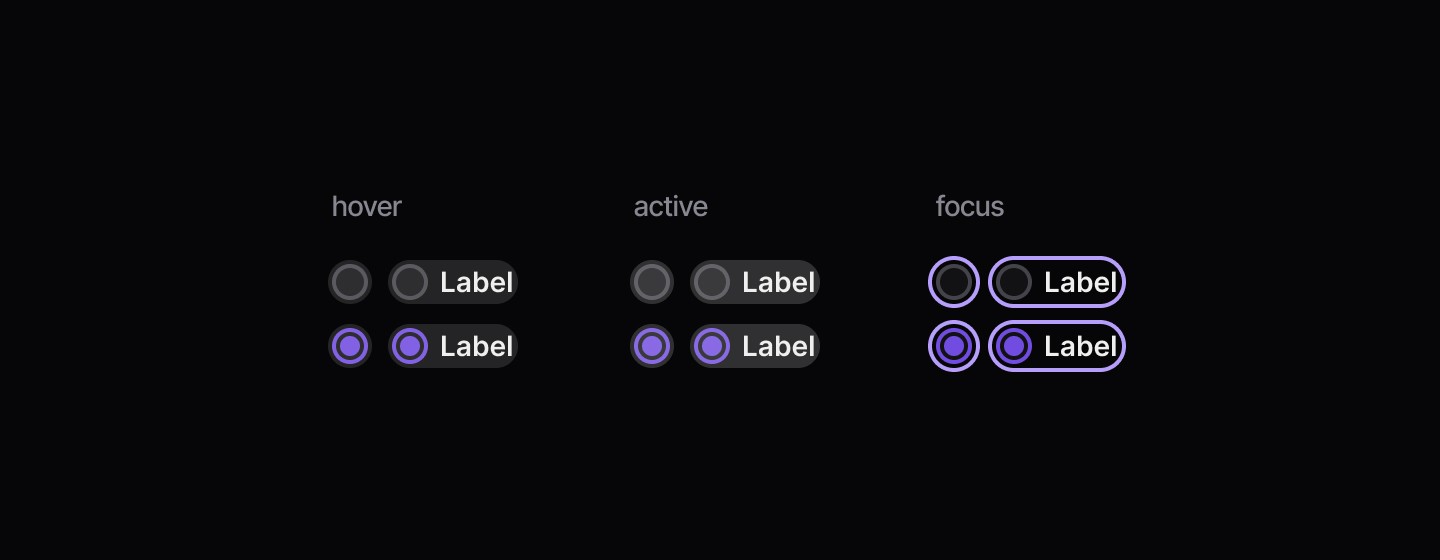
States
Disabled

When to use | When not to use |
|---|---|
✅ Use radios when users need to select only one option from a list | ⛔️ Place interactive elements (buttons, links, etc.) inside radio labels |
✅Prefer radios over a Select when the list is short, as they reduce clicks and improve efficiency | ⛔️ Use radios when multiple selections are allowed, use checkboxes instead |
✅ Assign each radio in the group a unique | ⛔️ Use radios for agreements such as “accepting terms of service”, use a checkbox instead |
Anatomy
Element | Description |
|---|---|
| Radio component |
| Label text of radio component |
Variants
States
Disabled
When to use | When not to use |
|---|---|
✅ Use radios when users need to select only one option from a list | ⛔️ Place interactive elements (buttons, links, etc.) inside radio labels |
✅Prefer radios over a Select when the list is short, as they reduce clicks and improve efficiency | ⛔️ Use radios when multiple selections are allowed, use checkboxes instead |
✅ Assign each radio in the group a unique | ⛔️ Use radios for agreements such as “accepting terms of service”, use a checkbox instead |
Anatomy
Element | Description |
|---|---|
| Radio component |
| Label text of radio component |
Variants
States
Disabled
Continue reading
Get in touch
Got a project in mind? Let’s chat. I’m always keen to hear about new ideas, collaborations, or challenges you’re looking to solve. Drop me a message and we can explore how to bring your vision to life together.
Get in touch
Got a project in mind? Let’s chat. I’m always keen to hear about new ideas, collaborations, or challenges you’re looking to solve. Drop me a message and we can explore how to bring your vision to life together.
Get in touch
Got a project in mind? Let’s chat. I’m always keen to hear about new ideas, collaborations, or challenges you’re looking to solve. Drop me a message and we can explore how to bring your vision to life together.