
Search…
Search…
Spacing
Live
This design system uses a structured spacing token system that provides consistent layout, sizing, and visual rhythm across all components and layouts.
AA
WCAG 2.1 accessibility compliant
Spacing
This design system uses a structured spacing token system that provides consistent layout, sizing, and visual rhythm across all components and layouts.
Spacing
Live
This design system uses a structured spacing token system that provides consistent layout, sizing, and visual rhythm across all components and layouts.
AA
WCAG 2.1 accessibility compliant
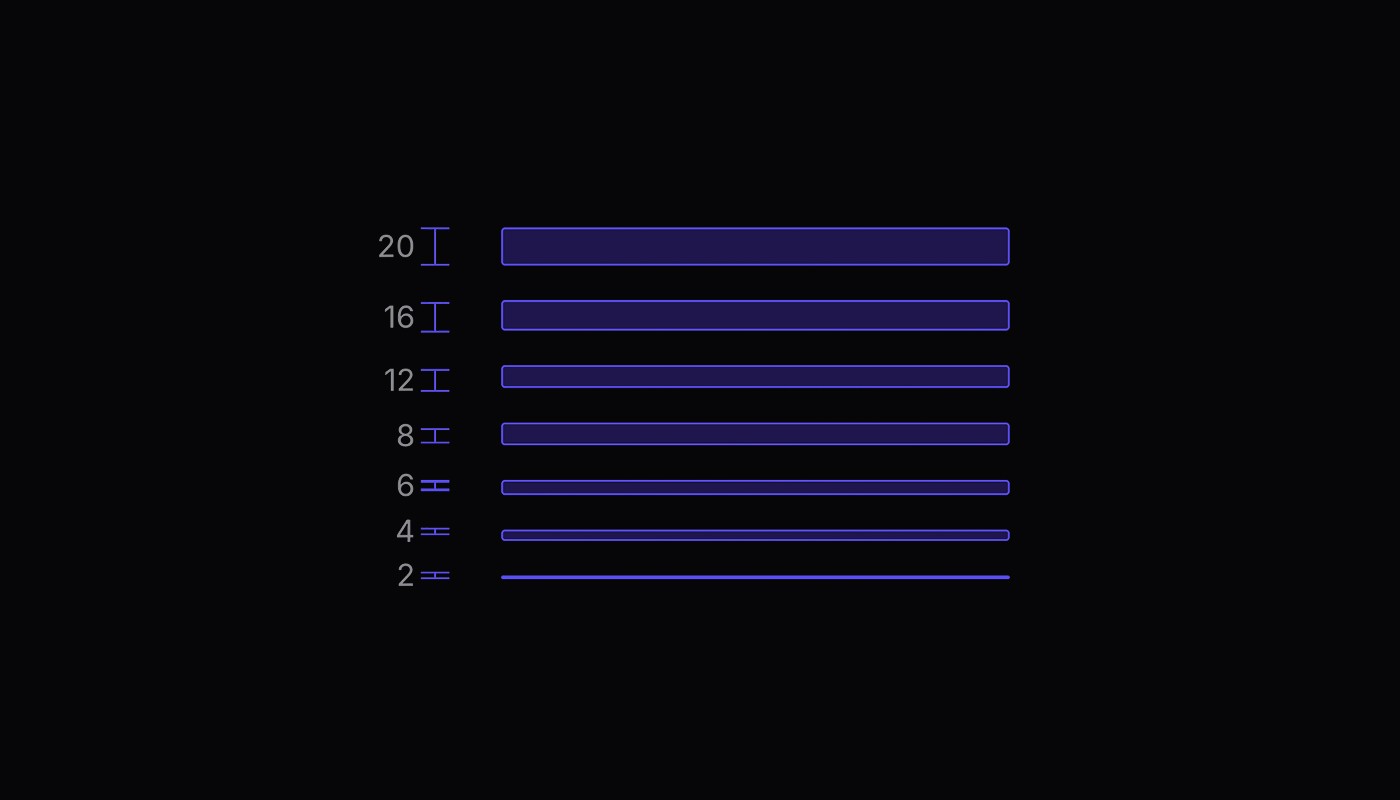
This design system uses a structured spacing token system to ensure consistency and balance across all components and layouts. Tokens are defined in a scalable scale (e.g. 4px, 8px, 16px…) and applied systematically to margins, padding, and gaps. This creates predictable relationships between elements, making interfaces easier to scan and more harmonious across breakpoints.
Token Categories
Category | Definition |
|---|---|
Space Tokens | General spacing for margins, padding, gaps, and layout spacing |
Control Height Tokens | Consistent heights for interactive elements like buttons, inputs, and controls |
Radius Tokens | Border radius values for consistent corner rounding and visual hierarchy |
Usage Best Practices
✅ Do's | Description |
|---|---|
Use tokens consistently | Don't mix token values with arbitrary spacing |
Choose semantic sizes | Select tokens based on the relationship between elements |
Maintain hierarchy | Use larger spacing for more important separations |
Test on mobile | Ensure spacing works across all device sizes |
❌ Don'ts | Description |
|---|---|
Don't use arbitrary values | Always use spacing tokens |
Don't skip scale steps | Use adjacent tokens for related spacing needs |
Don't mix scales | Stay consistent within component families |
Don't ignore touch targets | Use appropriate control heights for interactive elements |
Examples
/* ✅ Good - Using semantic tokens */
.component {
  padding: var(--ds-space-lg);
  gap: var(--ds-space-md);
  border-radius: var(--ds-radius-sm);
}

/* ❌ Bad - Arbitrary values */
.component {
  padding: 14px;
  gap: 9px;
  border-radius: 3px;
}

/* ✅ Good - Consistent hierarchy */
.card {
  padding: var(--ds-space-lg);        /* Internal spacing */
}
.card + .card {
  margin-top: var(--ds-space-xlg);    /* Larger gap between cards */
}

/* ❌ Bad - Inconsistent relationships */
.card {
  padding: var(--ds-space-xxlg);      /* Too much internal space */
}
.card + .card {
  margin-top: var(--ds-space-xs);     /* Too little separation */
}
Responsive Considerations
While spacing tokens are fixed values, they're designed to work across all screen sizes
Category | Definition |
|---|---|
Mobile-first design | All tokens provide adequate touch targets |
Consistent relationships | Token relationships maintain visual hierarchy at all sizes |
Accessibility | Control heights meet minimum 44px touch target recommendations |
Flexibility | Use CSS techniques like `clamp()` or media queries when responsive spacing is needed |
/* Responsive spacing when needed */
.responsive-container {
  padding: clamp(var(--ds-space-md), 4vw, var(--ds-space-xxlg));
}
Component Integration
Spacing tokens integrate seamlessly with the design system's other token layers:
/* Full integration example */
.ds-button {
  /* Spacing tokens */
  height: var(--ds-control-height-md);
  padding: 0 var(--ds-space-lg);
  border-radius: var(--ds-radius-md);
  gap: var(--ds-space-xs);

  /* Color tokens */
  background: var(--ds-disableable-color-button-primary-bg-neutral);
  color: var(--ds-disableable-color-foreground-light);

  /* Typography tokens */
  font: var(--running-small-bold);
}
This spacing token system provides the foundation for consistent, scalable, and maintainable layouts throughout the design system.
This design system uses a structured spacing token system to ensure consistency and balance across all components and layouts. Tokens are defined in a scalable scale (e.g. 4px, 8px, 16px…) and applied systematically to margins, padding, and gaps. This creates predictable relationships between elements, making interfaces easier to scan and more harmonious across breakpoints.
Token Categories
Category | Definition |
|---|---|
Space Tokens | General spacing for margins, padding, gaps, and layout spacing |
Control Height Tokens | Consistent heights for interactive elements like buttons, inputs, and controls |
Radius Tokens | Border radius values for consistent corner rounding and visual hierarchy |
Usage Best Practices
✅ Do's | Description |
|---|---|
Use tokens consistently | Don't mix token values with arbitrary spacing |
Choose semantic sizes | Select tokens based on the relationship between elements |
Maintain hierarchy | Use larger spacing for more important separations |
Test on mobile | Ensure spacing works across all device sizes |
❌ Don'ts | Description |
|---|---|
Don't use arbitrary values | Always use spacing tokens |
Don't skip scale steps | Use adjacent tokens for related spacing needs |
Don't mix scales | Stay consistent within component families |
Don't ignore touch targets | Use appropriate control heights for interactive elements |
Examples
/* ✅ Good - Using semantic tokens */
.component {
  padding: var(--ds-space-lg);
  gap: var(--ds-space-md);
  border-radius: var(--ds-radius-sm);
}

/* ❌ Bad - Arbitrary values */
.component {
  padding: 14px;
  gap: 9px;
  border-radius: 3px;
}

/* ✅ Good - Consistent hierarchy */
.card {
  padding: var(--ds-space-lg);        /* Internal spacing */
}
.card + .card {
  margin-top: var(--ds-space-xlg);    /* Larger gap between cards */
}

/* ❌ Bad - Inconsistent relationships */
.card {
  padding: var(--ds-space-xxlg);      /* Too much internal space */
}
.card + .card {
  margin-top: var(--ds-space-xs);     /* Too little separation */
}
Responsive Considerations
While spacing tokens are fixed values, they're designed to work across all screen sizes
Category | Definition |
|---|---|
Mobile-first design | All tokens provide adequate touch targets |
Consistent relationships | Token relationships maintain visual hierarchy at all sizes |
Accessibility | Control heights meet minimum 44px touch target recommendations |
Flexibility | Use CSS techniques like `clamp()` or media queries when responsive spacing is needed |
/* Responsive spacing when needed */
.responsive-container {
  padding: clamp(var(--ds-space-md), 4vw, var(--ds-space-xxlg));
}
Component Integration
Spacing tokens integrate seamlessly with the design system's other token layers:
/* Full integration example */
.ds-button {
  /* Spacing tokens */
  height: var(--ds-control-height-md);
  padding: 0 var(--ds-space-lg);
  border-radius: var(--ds-radius-md);
  gap: var(--ds-space-xs);

  /* Color tokens */
  background: var(--ds-disableable-color-button-primary-bg-neutral);
  color: var(--ds-disableable-color-foreground-light);

  /* Typography tokens */
  font: var(--running-small-bold);
}
This spacing token system provides the foundation for consistent, scalable, and maintainable layouts throughout the design system.
This design system uses a structured spacing token system to ensure consistency and balance across all components and layouts. Tokens are defined in a scalable scale (e.g. 4px, 8px, 16px…) and applied systematically to margins, padding, and gaps. This creates predictable relationships between elements, making interfaces easier to scan and more harmonious across breakpoints.
Token Categories
Category | Definition |
|---|---|
Space Tokens | General spacing for margins, padding, gaps, and layout spacing |
Control Height Tokens | Consistent heights for interactive elements like buttons, inputs, and controls |
Radius Tokens | Border radius values for consistent corner rounding and visual hierarchy |
Usage Best Practices
✅ Do's | Description |
|---|---|
Use tokens consistently | Don't mix token values with arbitrary spacing |
Choose semantic sizes | Select tokens based on the relationship between elements |
Maintain hierarchy | Use larger spacing for more important separations |
Test on mobile | Ensure spacing works across all device sizes |
❌ Don'ts | Description |
|---|---|
Don't use arbitrary values | Always use spacing tokens |
Don't skip scale steps | Use adjacent tokens for related spacing needs |
Don't mix scales | Stay consistent within component families |
Don't ignore touch targets | Use appropriate control heights for interactive elements |
Examples
/* ✅ Good - Using semantic tokens */
.component {
  padding: var(--ds-space-lg);
  gap: var(--ds-space-md);
  border-radius: var(--ds-radius-sm);
}

/* ❌ Bad - Arbitrary values */
.component {
  padding: 14px;
  gap: 9px;
  border-radius: 3px;
}

/* ✅ Good - Consistent hierarchy */
.card {
  padding: var(--ds-space-lg);        /* Internal spacing */
}
.card + .card {
  margin-top: var(--ds-space-xlg);    /* Larger gap between cards */
}

/* ❌ Bad - Inconsistent relationships */
.card {
  padding: var(--ds-space-xxlg);      /* Too much internal space */
}
.card + .card {
  margin-top: var(--ds-space-xs);     /* Too little separation */
}
Responsive Considerations
While spacing tokens are fixed values, they're designed to work across all screen sizes
Category | Definition |
|---|---|
Mobile-first design | All tokens provide adequate touch targets |
Consistent relationships | Token relationships maintain visual hierarchy at all sizes |
Accessibility | Control heights meet minimum 44px touch target recommendations |
Flexibility | Use CSS techniques like `clamp()` or media queries when responsive spacing is needed |
/* Responsive spacing when needed */
.responsive-container {
  padding: clamp(var(--ds-space-md), 4vw, var(--ds-space-xxlg));
}
Component Integration
Spacing tokens integrate seamlessly with the design system's other token layers:
/* Full integration example */
.ds-button {
  /* Spacing tokens */
  height: var(--ds-control-height-md);
  padding: 0 var(--ds-space-lg);
  border-radius: var(--ds-radius-md);
  gap: var(--ds-space-xs);

  /* Color tokens */
  background: var(--ds-disableable-color-button-primary-bg-neutral);
  color: var(--ds-disableable-color-foreground-light);

  /* Typography tokens */
  font: var(--running-small-bold);
}
This spacing token system provides the foundation for consistent, scalable, and maintainable layouts throughout the design system.
Continue reading
Get in touch
Got a project in mind? Let’s chat. I’m always keen to hear about new ideas, collaborations, or challenges you’re looking to solve. Drop me a message and we can explore how to bring your vision to life together.
Get in touch
Got a project in mind? Let’s chat. I’m always keen to hear about new ideas, collaborations, or challenges you’re looking to solve. Drop me a message and we can explore how to bring your vision to life together.
Get in touch
Got a project in mind? Let’s chat. I’m always keen to hear about new ideas, collaborations, or challenges you’re looking to solve. Drop me a message and we can explore how to bring your vision to life together.